
Basic Concepts
Basic Concepts
1. General Time Series Database Concepts
This section introduces basic concepts commonly used in time series databases, including time series data, time series, devices, timeseries, data points, collection frequency, TTL, schema, encoding, and compression.
1.1 Time Series Data
In scenarios such as IoT, industrial production, energy and power, connected vehicles, and infrastructure monitoring, devices usually use sensors to continuously collect status data about themselves or their environment. For example, motors collect voltage and current, wind turbines collect blade speed, angular velocity, and power generation, vehicles collect longitude, latitude, speed, and fuel consumption, and bridges collect vibration frequency, deflection, and displacement.
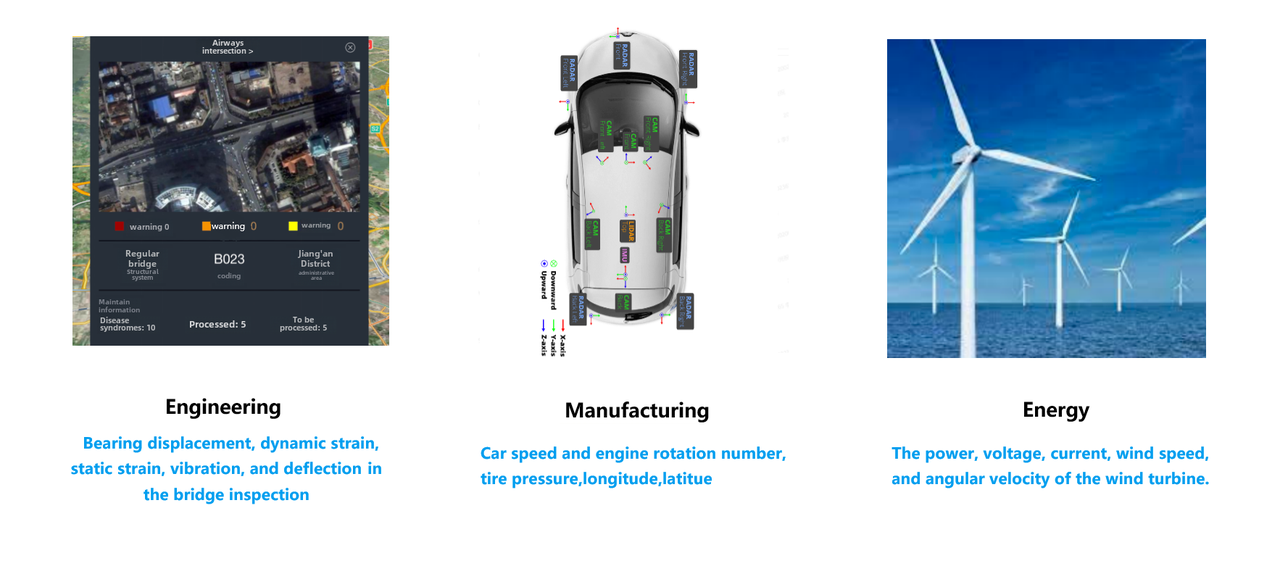
The common feature of this type of data is that it is related to time: the same collection object continuously generates new records as time passes. Data that is continuously generated and recorded in chronological order is called time series data.
1.2 Time Series
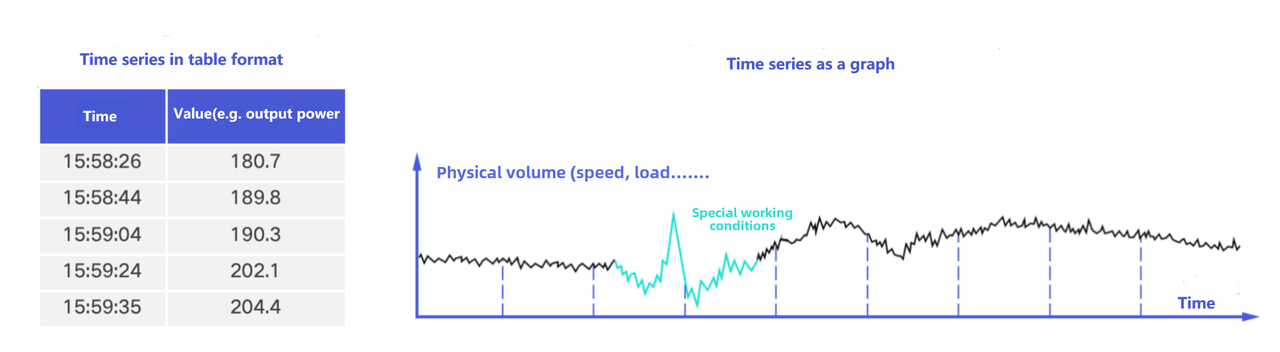
In time series data scenarios, a collection point continuously generates data points over time. When these data points are arranged in ascending timestamp order, they form a time series. In table form, a time series can be represented as a data table made up of time and value. In graph form, a time series can be represented as a trend curve that changes over time, and can also be described figuratively as the "electrocardiogram" of a device.
1.3 Device
A device, also called an entity or equipment, is a device or apparatus with physical quantities in a real-world scenario. It can be a physical device, a measurement apparatus, or a collection of sensors.
Common examples are as follows:
| Scenario | Device Example | Identifier Example |
|---|---|---|
| Energy | Wind turbine | Region, station, line, model, instance, etc. |
| Factory | Robotic arm | Unique ID generated by an IoT platform |
| Connected vehicle | Vehicle | Vehicle identification number (VIN) |
| Monitoring | CPU | Equipment room, rack, hostname, device type, etc. |
1.4 Timeseries
A timeseries can also be called a physical quantity, time series, timeline, signal, metric, point, or measured value. It is the measurement information recorded by a detection device in a real-world scenario. Usually, one physical quantity represents one collection point that can periodically collect a physical quantity from its environment or device. When the data points generated by a timeseries are arranged in ascending timestamp order, they form a time series.
Common examples are as follows:
| Scenario | Timeseries Example |
|---|---|
| Energy and power | Current, voltage, wind speed, rotational speed |
| Connected vehicle | Fuel level, vehicle speed, longitude, latitude |
| Factory | Temperature, humidity |
1.5 Data Point
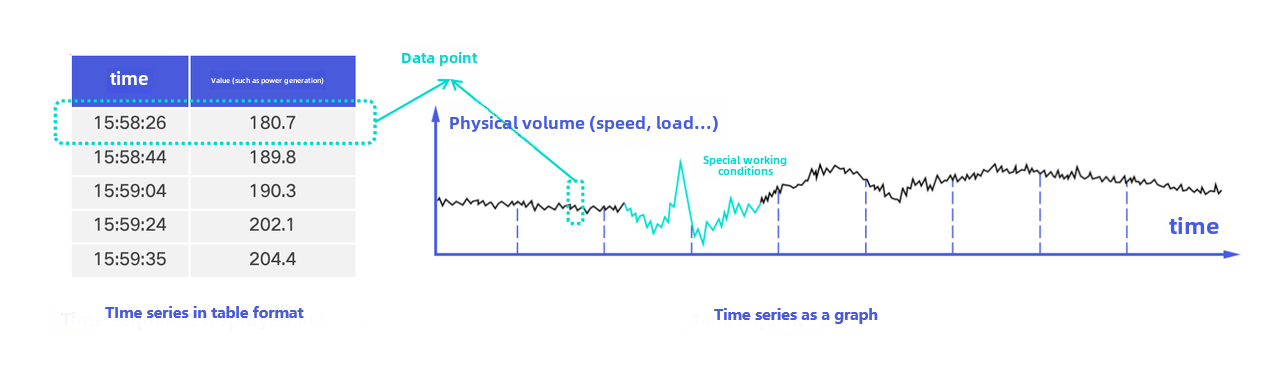
A data point consists of a timestamp and a value. The timestamp indicates when the data was generated, and the value indicates the collection result of the timeseries at that time. The value can be of various types, such as BOOLEAN, FLOAT, and INT32.
A row in a tabular time series, or a point in a trend chart, can be understood as a data point.
1.6 Collection Frequency
Collection frequency refers to the number of times a physical quantity generates data within a certain period. For example, if a temperature sensor collects temperature data once per second, its collection frequency is 1 Hz, that is, once per second.
The higher the collection frequency, the more data points are generated per unit of time, and the higher the requirements for write, storage, and query capabilities.
1.7 Data Retention Time (TTL)
TTL specifies the retention time of data. Data beyond the TTL will be automatically deleted.
Using TTL properly can control disk space usage, avoid exceptions such as disks becoming full, and help maintain query performance and reduce memory usage.
1.8 Schema
Schema is the data model information of a database and is used to describe the structure and definition of data. For the tree model, schema usually includes path hierarchy, devices, timeseries, data types, encoding, and compression methods.
1.9 Encoding and Compression
Encoding is a compression technique used to represent data in binary form and improve storage efficiency. Compression further compresses the encoded binary data to improve storage efficiency.
For details about encoding and compression supported by IoTDB, see Compression and Encoding.
2. Common IoTDB Concepts
This section introduces common concepts in the IoTDB tree model, distributed architecture, and deployment. These concepts explain how IoTDB organizes, manages, and deploys time series data by using hierarchical paths.
2.1 Data Model Concepts
2.1.1 Data Model (sql_dialect)
IoTDB supports two data models: tree model and table model. The core objects managed by both models are devices and timeseries, but their organization methods and syntax are different.
Tree model: Manages data through hierarchical paths, where one path corresponds to one timeseries of one device.
Table model: Manages data through relational tables. It is recommended that one table correspond to one type of device.
Both model spaces can exist in the same cluster instance. Different models use different syntax and database naming methods, and are not visible to each other by default.
2.1.2 Database
In the tree model, a database is a path segment prefixed with root. and can be understood as an upper-level management boundary for tree model data. During modeling, it is usually recommended to use only the first-level node under root as the database, such as root.db.
Neither a parent node nor a child node of a database can be set as another database. A database can also make full use of machine resources, so creating multiple databases for performance reasons is usually unnecessary.
2.1.3 Timeseries and Device
A timeseries is a complete path prefixed with the database path and separated by English periods (.). It can contain any number of levels. Each timeseries can have its own data type, encoding method, and compression method.
In the tree model, the penultimate level is usually regarded as the device. For example, in root.db.turbine.device1.metric1, the device1 level is the device, and metric1 is the timeseries. A device cannot be created independently and usually exists as timeseries are created.
During modeling, it is recommended to put only the tags that uniquely identify a timeseries into the path, generally no more than 10 levels. Put low-cardinality tags as early as possible so that the system can compress common prefixes.
If the number of devices is small but each device has many timeseries, you can add a level such as
.valueat the end so that the penultimate level has a sufficient number of nodes, for example,root.db.device01.metric.value.
2.1.4 Alias, Tag, and Attribute
When creating a timeseries, you can add an alias, tags, and attributes to it. An alias is bound to the timeseries and can be used equivalently in scenarios where the original timeseries name is used. A temporary alias in an SQL query only replaces the name in the query result and is not bound to the timeseries.
| Concept | Purpose |
|---|---|
| Alias | Bound to a timeseries and used instead of the original timeseries name for access |
| Tag | Can be used to query timeseries paths. The system maintains a "tag -> timeseries path" index |
| Attribute | Used to describe a timeseries. Attribute information can only be queried from the timeseries path |
2.2 Distributed Concepts
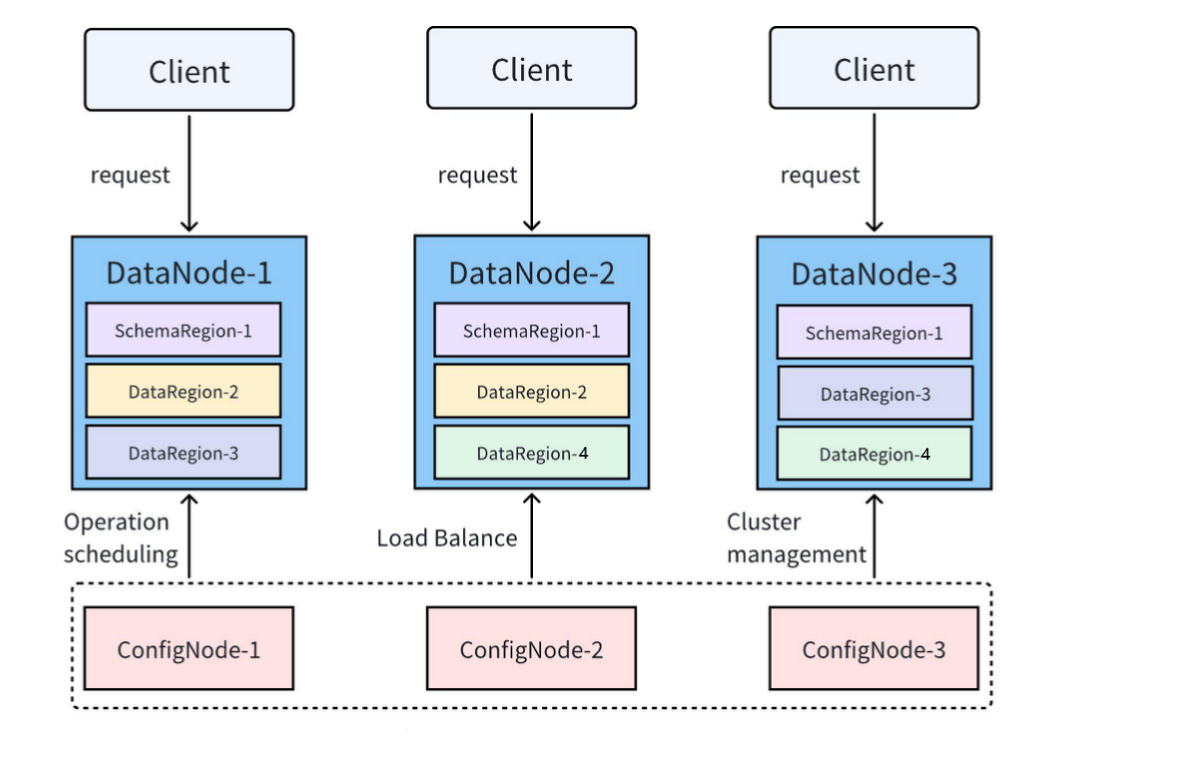
IoTDB supports cluster deployment. Common concepts in a cluster include nodes, Regions, and multiple replicas. A common cluster deployment mode is 3C3D, that is, 3 ConfigNodes and 3 DataNodes.
2.2.1 Node
An IoTDB cluster includes three types of nodes: ConfigNode, DataNode, and AINode.
ConfigNode: Manages node information, configuration information, user permissions, schema, partition information, and other cluster information. It is responsible for scheduling distributed operations and load balancing. All ConfigNodes are full backups of each other.
DataNode: Serves client requests and is responsible for data storage and computation.
AINode: Provides machine learning capabilities. It supports registering trained machine learning models and invoking models for inference through SQL.
2.2.2 Data Partition (Region)
In IoTDB, both schema and data are divided into smaller partitions, namely Regions, and are managed by DataNodes in the cluster.
SchemaRegion: A schema partition used to manage the schema of some devices and timeseries.
DataRegion: A data partition used to manage the data of some devices within a period of time.
Regions with the same RegionID on different DataNodes are replicas of each other.
2.2.3 Multiple Replicas
The number of replicas for data and schema is configurable. Multiple replicas can provide high-availability services.
| Category | Configuration Item | Recommended Standalone Configuration | Recommended Cluster Configuration |
|---|---|---|---|
| Schema | schema_replication_factor | 1 | 3 |
| Data | data_replication_factor | 1 | 2 |
2.3 Deployment Concepts
IoTDB has two running modes: standalone mode and cluster mode.
2.3.1 Standalone Mode
An IoTDB standalone instance includes 1 ConfigNode and 1 DataNode, that is, 1C1D.
Features: Easy for developers to install and deploy, with low deployment and maintenance costs and convenient operations.
Applicable scenarios: Scenarios with limited resources or low high-availability requirements, such as edge servers.
Deployment method: Standalone deployment.
2.3.2 Cluster Mode
An IoTDB cluster instance consists of 3 ConfigNodes and no fewer than 3 DataNodes, usually 3 DataNodes, that is, 3C3D. When some nodes fail, the remaining nodes can still provide services externally, ensuring high availability of database services. Database performance can also be improved by adding nodes.
Features: High availability and high scalability. System performance can be improved by adding DataNodes.
Applicable scenarios: Enterprise application scenarios that require high availability and reliability.
Deployment method: Cluster deployment.
2.3.3 Feature Summary
| Dimension | Standalone Mode | Cluster Mode |
|---|---|---|
| Applicable scenarios | Edge deployment; low high-availability requirements | High-availability services; disaster recovery scenarios, etc. |
| Required number of machines | 1 | >= 3 |
| Safety and reliability | Cannot tolerate a single point of failure | High; can tolerate a single point of failure |
| Scalability | Can scale DataNodes to improve performance | Can scale DataNodes to improve performance |
| Performance | Can scale with the number of DataNodes | Can scale with the number of DataNodes |
Standalone mode and cluster mode have similar deployment steps: ConfigNodes and DataNodes are added one by one. The differences are only in the number of replicas and the minimum number of nodes that can provide services.