
GROUP BY Clause
GROUP BY Clause
1. Syntax Overview
GROUP BY expression (',' expression)*- The GROUP BY clause is used to group the result set of a SELECT statement by the values of the specified columns for aggregated computation. The values of these grouping columns are kept as-is in the result, while all other records that share the same grouping column values are computed through the specified aggregate functions (e.g., COUNT, AVG).
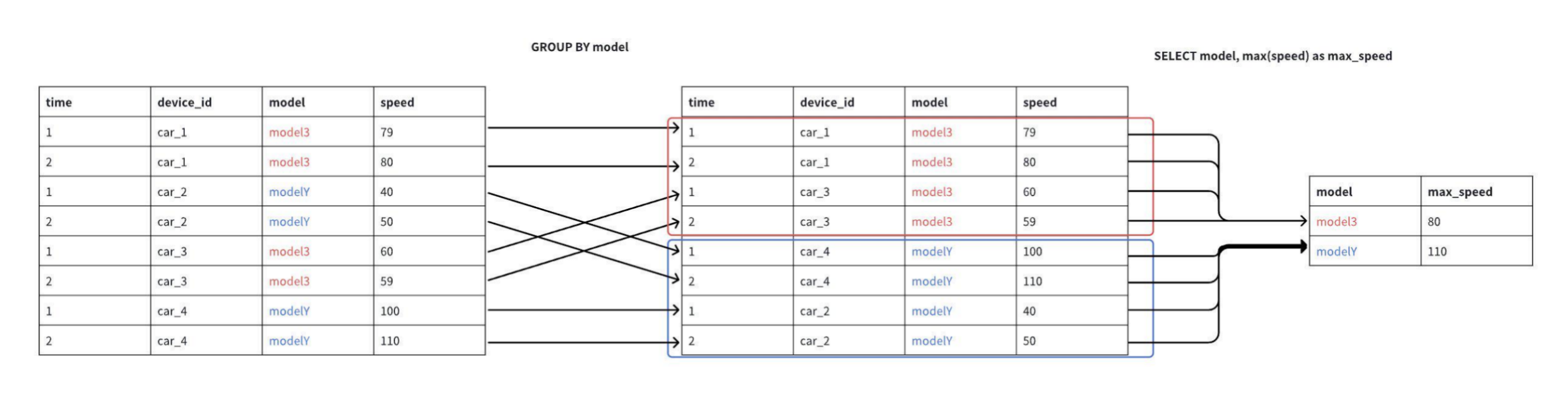
2. Notes
- Items in the SELECT clause must either contain aggregate functions or consist of columns that appear in the GROUP BY clause.
Valid example:
SELECT concat(device_id, model_id), avg(temperature)
  FROM table1
  GROUP BY device_id, model_id;
Results:
+-----+-----+
|_col0|_col1|
+-----+-----+
| 100A| 90.0|
| 100C| 86.0|
| 100E| 90.0|
| 101B| 85.0|
| 101D| 85.0|
| 101F| 90.0|
+-----+-----+
Total line number = 6
It costs 0.094s
Invalid example 1:
SELECT device_id, temperature
  FROM table1
  GROUP BY device_id;
Results:
Msg: org.apache.iotdb.jdbc.IoTDBSQLException: 701:
  'temperature' must be an aggregate expression or appear in GROUP BY clause
Invalid example 2:
SELECT device_id, avg(temperature)
  FROM table1
  GROUP BY model;
Results:
Msg: org.apache.iotdb.jdbc.IoTDBSQLException: 701:
Column 'model' cannot be resolved- If there is no GROUP BY clause, all items in the SELECT clause must either contain aggregate functions or contain no aggregate functions at all.
Valid example:
SELECT COUNT(*), avg(temperature)
  FROM table1;
Results:
+-----+-----------------+
|_col0|            _col1|
+-----+-----------------+
|   18|87.33333333333333|
+-----+-----------------+
Total line number = 1
It costs 0.094s
Invalid example:
SELECT humidity, avg(temperature) FROM table1;Results:
Msg: org.apache.iotdb.jdbc.IoTDBSQLException: 701:
'humidity' must be an aggregate expression or appear in GROUP BY clause- The GROUP BY clause can use constant integers starting from 1 to reference items in the SELECT clause. If the constant integer is less than 1 or greater than the size of the select item list, an error will be thrown.
SELECT date_bin(1h, time), device_id, avg(temperature)
  FROM table1
  WHERE time >= 2024-11-27 00:00:00  and time <= 2024-11-29 00:00:00
  GROUP BY 1, device_id;
Results:
+-----------------------------+---------+-----+
|                        _col0|device_id|_col2|
+-----------------------------+---------+-----+
|2024-11-28T08:00:00.000+08:00|      100| 85.0|
|2024-11-28T09:00:00.000+08:00|      100| null|
|2024-11-28T10:00:00.000+08:00|      100| 85.0|
|2024-11-28T11:00:00.000+08:00|      100| 88.0|
|2024-11-27T16:00:00.000+08:00|      101| 85.0|
+-----------------------------+---------+-----+
Total line number = 5
It costs 0.092s- In versions prior to V2.0.11, using the alias of a select item in the GROUP BY clause was not supported. You needed to use the complete expression (or the constant index of the select item) instead, as shown in the following SQL:
SELECT date_bin(1h, time) AS hour_time, device_id, avg(temperature)
  FROM table1
  WHERE time >= 2024-11-27 00:00:00  and time <= 2024-11-29 00:00:00
  GROUP BY date_bin(1h, time), device_id;
Results:
+-----------------------------+---------+-----+
|                    hour_time|device_id|_col2|
+-----------------------------+---------+-----+
|2024-11-28T08:00:00.000+08:00|      100| 85.0|
|2024-11-28T09:00:00.000+08:00|      100| null|
|2024-11-28T10:00:00.000+08:00|      100| 85.0|
|2024-11-28T11:00:00.000+08:00|      100| 88.0|
|2024-11-27T16:00:00.000+08:00|      101| 85.0|
+-----------------------------+---------+-----+
Total line number = 5
It costs 0.092s- Since V2.0.11, the GROUP BY clause supports referencing aliases explicitly defined in the SELECT clause.
- This capability only applies when directly referencing the alias itself; names with table name prefixes (e.g.,
GROUP BY table1.hour_time) are not expanded as SELECT aliases and are still resolved as regular expressions. - A name referenced in GROUP BY is first resolved as an input column of the current query; only when it cannot be resolved as an input column will it be further resolved as a SELECT alias. If multiple aliases with the same name exist in the SELECT list, an ambiguity error will be thrown when referencing that alias.
- After alias resolution in GROUP BY, the existing GROUP BY validation rules still apply. For example, grouping keys cannot contain aggregate functions, window functions, or grouping functions.
- This capability only applies when directly referencing the alias itself; names with table name prefixes (e.g.,
Valid example:
SELECT date_bin(1h, time) AS hour_time, device_id, avg(temperature)
  FROM table1
  WHERE time >= 2024-11-27 00:00:00  and time <= 2024-11-29 00:00:00
  GROUP BY hour_time, device_id;
Results:
+-----------------------------+---------+-----+
|                    hour_time|device_id|_col2|
+-----------------------------+---------+-----+
|2024-11-28T08:00:00.000+08:00|      100| 85.0|
|2024-11-28T09:00:00.000+08:00|      100| null|
|2024-11-28T10:00:00.000+08:00|      100| 85.0|
|2024-11-28T11:00:00.000+08:00|      100| 88.0|
|2024-11-27T16:00:00.000+08:00|      101| 85.0|
+-----------------------------+---------+-----+
Total line number = 5
It costs 0.228s
Invalid example 1: multiple aliases with the same name in one statement
SELECT temperature AS value, humidity AS value
  FROM table1
  GROUP BY value;
Results:
Msg: org.apache.iotdb.jdbc.IoTDBSQLException: 701: Column alias 'value' is ambiguous at positions 1, 2Invalid example 2: grouping keys containing aggregate functions
SELECT AVG(temperature) AS avg_temperature
  FROM table1
  GROUP BY avg_temperature;
Results:
Msg: org.apache.iotdb.jdbc.IoTDBSQLException: 701: GROUP BY clause cannot contain aggregations, window functions or grouping operations: [AVG(temperature)]- Only the COUNT function can be used with an asterisk (
*) to count the total number of rows in a table. Using other aggregate functions with*will throw an error.
SELECT count(*) FROM table1;Results:
+-----+
|_col0|
+-----+
|   18|
+-----+
Total line number = 1
It costs 0.047s
3. Sample Dataset
The Example Data page provides SQL statements to construct table schemas and insert data. By downloading and executing these statements in the IoTDB CLI, you can import the data into IoTDB. This data can be used to test and run the example SQL queries included in this documentation, allowing you to reproduce the described results.
Example 1: Downsampling Time Series Data
Downsample the temperature of device 101 over the following time range, returning an average temperature per hour.
SELECT date_bin(1h, time) AS hour_time, AVG(temperature) AS avg_temperature
  FROM table1
  WHERE time >= 2024-11-27 00:00:00  and time <= 2024-11-30 00:00:00
  AND device_id='101'
  GROUP BY 1;
Since V2.0.11, GROUP BY items can directly reference aliases explicitly defined in the SELECT clause, so the SQL above can be written as:
SELECT date_bin(1h, time) AS hour_time, AVG(temperature) AS avg_temperature
  FROM table1
  WHERE time >= 2024-11-27 00:00:00  and time <= 2024-11-30 00:00:00
  AND device_id='101'
  GROUP BY hour_time;
Results:
+-----------------------------+---------------+
|                    hour_time|avg_temperature|
+-----------------------------+---------------+
|2024-11-29T10:00:00.000+08:00|           85.0|
|2024-11-27T16:00:00.000+08:00|           85.0|
+-----------------------------+---------------+
Total line number = 2
It costs 0.054s
Downsample the temperature of each device over the past day, returning an average temperature per hour.
SELECT date_bin(1h, time) AS hour_time, device_id, AVG(temperature) AS avg_temperature
  FROM table1
  WHERE time >= 2024-11-27 00:00:00  and time <= 2024-11-30 00:00:00
  GROUP BY 1, device_id;
Results:
+-----------------------------+---------+---------------+
|                    hour_time|device_id|avg_temperature|
+-----------------------------+---------+---------------+
|2024-11-29T11:00:00.000+08:00|      100|           null|
|2024-11-29T18:00:00.000+08:00|      100|           90.0|
|2024-11-28T08:00:00.000+08:00|      100|           85.0|
|2024-11-28T09:00:00.000+08:00|      100|           null|
|2024-11-28T10:00:00.000+08:00|      100|           85.0|
|2024-11-28T11:00:00.000+08:00|      100|           88.0|
|2024-11-29T10:00:00.000+08:00|      101|           85.0|
|2024-11-27T16:00:00.000+08:00|      101|           85.0|
+-----------------------------+---------+---------------+
Total line number = 8
It costs 0.081s
For more details on the date_bin function, refer to the Definition of Date Bin (Time Bucketing) feature documentation.
Example 2: Querying the Latest Data Point of Each Device
SELECT device_id, LAST(temperature), LAST_BY(time, temperature)
  FROM table1
  GROUP BY device_id;
Results:
+---------+-----+-----------------------------+
|device_id|_col1|                        _col2|
+---------+-----+-----------------------------+
|      100| 90.0|2024-11-29T18:30:00.000+08:00|
|      101| 90.0|2024-11-30T14:30:00.000+08:00|
+---------+-----+-----------------------------+
Total line number = 2
It costs 0.078s
Example 3: Counting Total Rows
Count the total number of rows of all devices:
SELECT COUNT(*) FROM table1;Results:
+-----+
|_col0|
+-----+
|   18|
+-----+
Total line number = 1
It costs 0.060s
Count the total number of rows of each device:
SELECT device_id, COUNT(*) AS total_rows
  FROM table1
  GROUP BY device_id;
Results:
+---------+----------+
|device_id|total_rows|
+---------+----------+
|      100|         8|
|      101|        10|
+---------+----------+
Total line number = 2
It costs 0.060s
Example 4: Aggregation Without a GROUP BY Clause
Query the maximum temperature across all devices:
SELECT MAX(temperature)
FROM table1;
Results:
+-----+
|_col0|
+-----+
| 90.0|
+-----+
Total line number = 1
It costs 0.086s
Example 5: Aggregating the Results of a Subquery
Query the plant and device combinations whose average temperature exceeds 80.0 with at least two records during the specified time period:
SELECT plant_id, device_id
FROM (
    SELECT date_bin(10m, time) AS time, plant_id, device_id, AVG(temperature) AS temp FROM table1 WHERE time >= 2024-11-26 00:00:00 AND time <= 2024-11-29 00:00:00
    GROUP BY 1, plant_id, device_id
)
WHERE temp > 80.0
GROUP BY plant_id, device_id
HAVING COUNT(*) > 1;
Results:
+--------+---------+
|plant_id|device_id|
+--------+---------+
|    1001|      101|
|    3001|      100|
+--------+---------+
Total line number = 2
It costs 0.073s