
AINode Deployment
AINode Deployment
1. AINode Introduction
1.1 Capability Introduction
AINode is the third type of endogenous node provided by IoTDB after ConfigNode and DataNode. By interacting with the DataNodes and ConfigNodes of an IoTDB cluster, this node extends the capability for machine learning analysis on time series. AINode integrates model management, training, and inference within the database engine. It supports performing time series analysis tasks on specified time series data using registered models through simple SQL statements and also supports registering and using custom machine learning models. AINode currently integrates machine learning algorithms and self-developed models for common time series analysis scenarios (e.g., forecasting).
1.2 Deployment Modes
AINode is an additional component outside the IoTDB cluster and is deployed using a separate installation package.
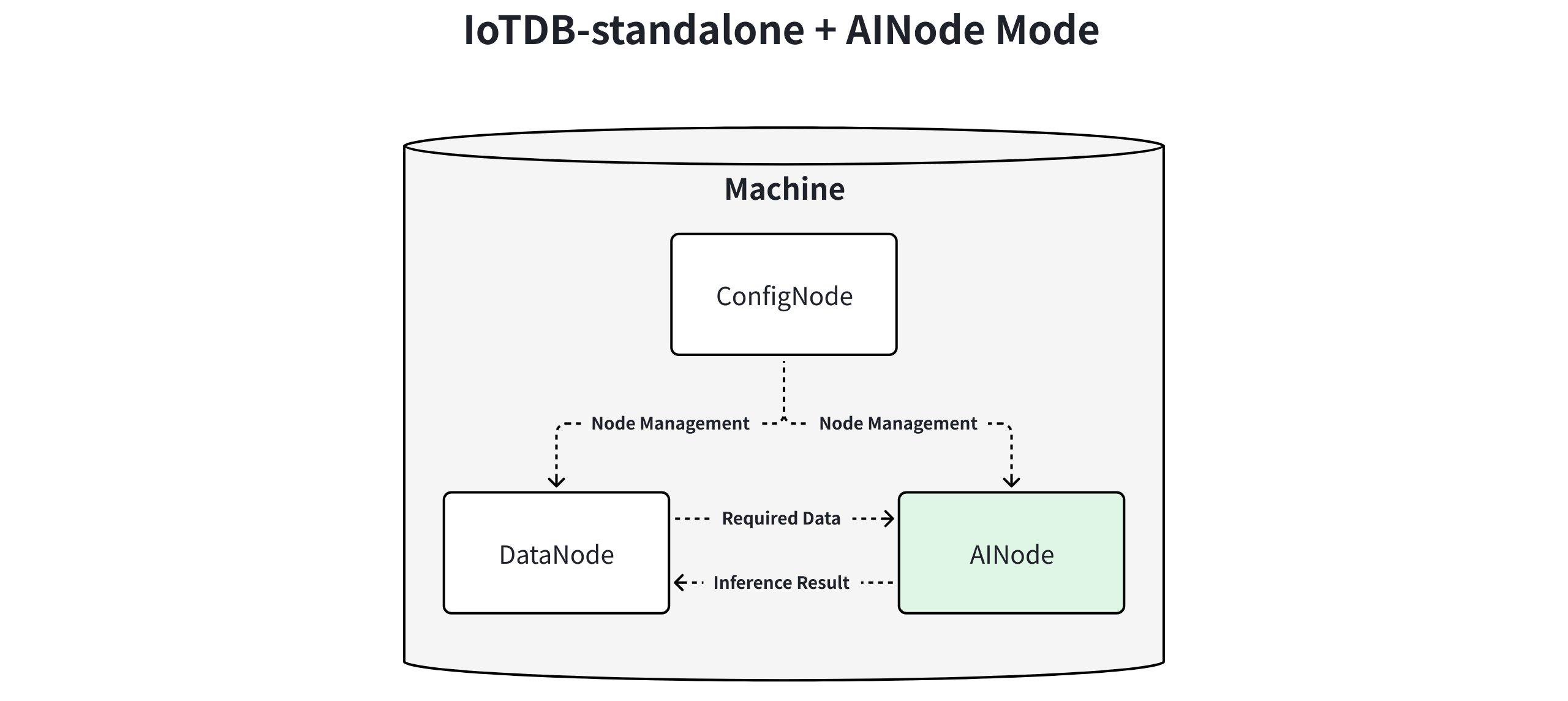
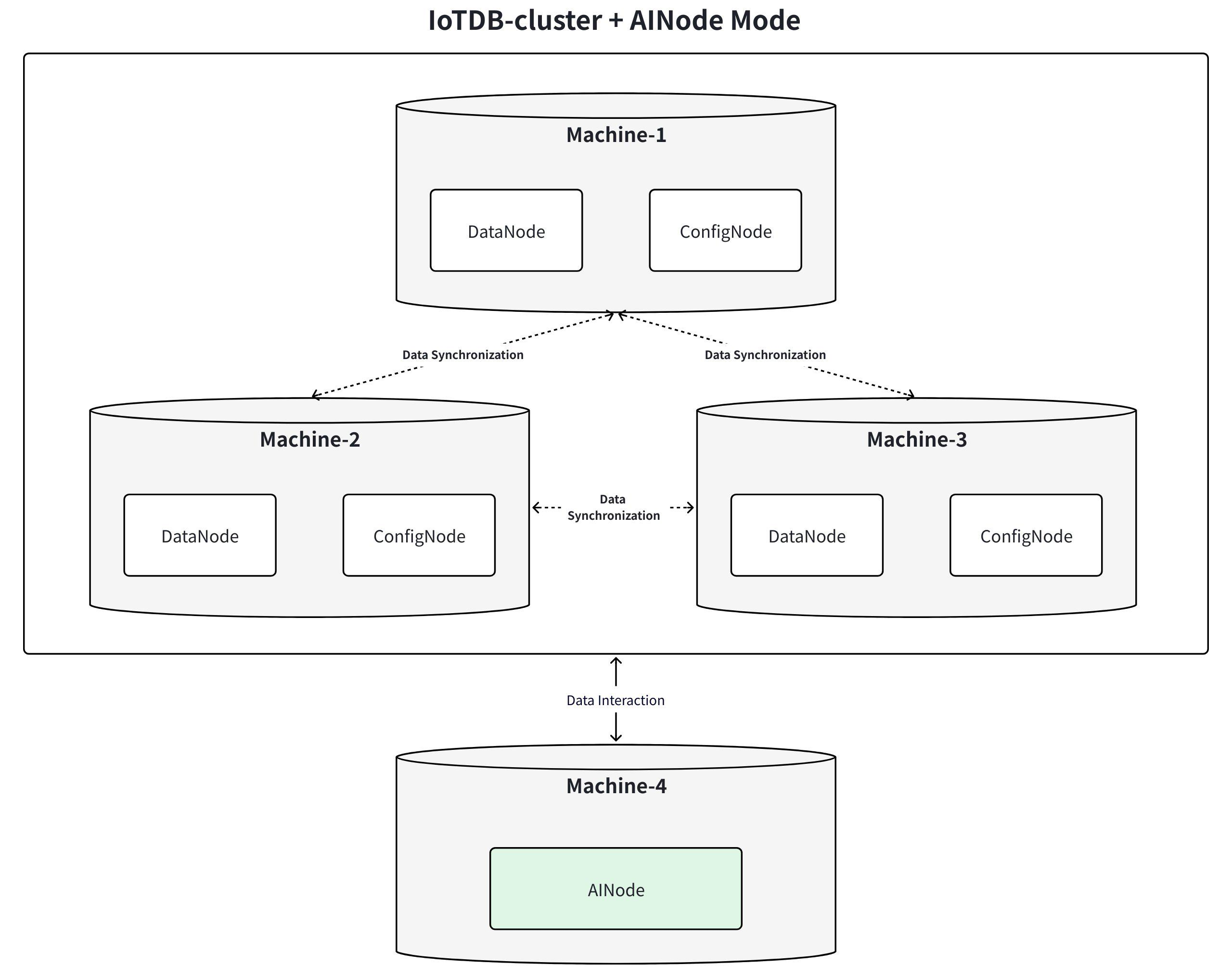
2. Installation Preparation
2.1 Installation Package Acquisition
The key directory structure after extracting the AINode installation package (apache-iotdb-<version>-ainode-bin.zip) is as follows:
| Directory | Type | Description |
|---|---|---|
| lib | Folder | Executable programs and dependencies for AINode |
| sbin | Folder | Operation scripts for AINode, used to start or stop AINode |
| conf | Folder | Configuration files and version declaration file for AINode |
Note: AINode supports building the installation package from source code. For specific steps, please refer to the AINode Build section.
2.2 Pre-installation Verification
To ensure the AINode installation package you obtained is complete and correct, it is recommended to perform an SHA512 verification before installation and deployment.
Preparation:
- Obtain the official SHA512 checksum.
Verification Steps (using Linux as an example):
- Open a terminal, navigate to the directory containing the installation package (e.g.,
/data/ainode):cd /data/ainode - Execute the following command to calculate the hash value:
sha512sum apache-iotdb-<version>-ainode-bin.zip - The terminal will output the result (left side is the SHA512 checksum, right side is the filename):
(base) root@hadoop@1:/data/ainode (0.664s) sha512sum apache-iotdb-2.0.5-ainode-bin.zip b39039a1235a86bc3ce3df0a102efa215e281b5839683ccaf47883b390af4e686f99e6980a24a9d41348325f3518bd55ebb1c61a123495cbdc575dad8c695f28 apache-iotdb-2.0.5-ainode-bin.zip - Compare the output with the official SHA512 checksum. If they match, you can proceed with the AINode installation and deployment steps below.
Notes:
- If the verification results do not match, please obtain a new installation package.
- If you encounter a "file not found" prompt during verification, check if the file path is correct or if the installation package was downloaded completely.
2.3 Environment Requirements
- Recommended operating environment: Linux, macOS.
- IoTDB Version: >= V2.0.8.
3. Installation, Deployment, and Usage
3.1 Installing AINode
Download the AINode installation package, import it into a dedicated folder, switch to that folder, and extract the package.
unzip apache-iotdb-<version>-ainode-bin.zip3.2 Modifying Configuration Items
AINode supports modifying some necessary parameters. You can find the following parameters in the /IOTDB_AINODE_HOME/conf/iotdb-ainode.properties file and make persistent modifications:
| Name | Description | Type | Default Value |
|---|---|---|---|
cluster_name | The cluster identifier the AINode is to join | String | defaultCluster |
ain_seed_config_node | The ConfigNode address for AINode registration upon startup | String | 127.0.0.1:10710 |
ain_cluster_ingress_address | The rpc address of the DataNode from which AINode pulls data | String | 127.0.0.1 |
ain_cluster_ingress_port | The rpc port of the DataNode from which AINode pulls data | Integer | 6667 |
ain_cluster_ingress_username | The client username for the DataNode from which AINode pulls data | String | root |
ain_cluster_ingress_password | The client password for the DataNode from which AINode pulls data | String | root |
ain_rpc_address | The address for AINode service provision and communication (internal service communication interface) | String | 127.0.0.1 |
ain_rpc_port | The port for AINode service provision and communication | String | 10810 |
ain_system_dir | AINode metadata storage path. The starting directory for relative paths is OS-dependent; using an absolute path is recommended. | String | data/AINode/system |
ain_models_dir | AINode model file storage path. The starting directory for relative paths is OS-dependent; using an absolute path is recommended. | String | data/AINode/models |
ain_thrift_compression_enabled | Whether to enable Thrift compression mechanism for AINode. 0-disable, 1-enable. | Boolean | 0 |
3.3 Importing Built-in Weight Files
If the deployment environment has network connectivity and can access HuggingFace, the system will automatically pull the built-in model weight files. This step can be skipped.
For offline environments, prepare the model weight folder in advance and place it under the /IOTDB_AINODE_HOME/data/ainode/models/builtin directory.
NOTE: Pay attention to the directory hierarchy. The parent directory for all built-in model weights should be builtin.
3.4 Starting AINode
After completing the deployment of ConfigNodes, you can add an AINode to support time series model management and inference functionality. After specifying the IoTDB cluster information in the configuration items, you can execute the corresponding command to start the AINode and join the IoTDB cluster.
# Startup command
# Linux and macOS systems
bash sbin/start-ainode.sh

# Windows system
sbin\start-ainode.bat

# Background startup command (recommended for long-term operation)
# Linux and macOS systems
bash sbin/start-ainode.sh -d

# Windows system
sbin\start-ainode.bat -d
3.5 Checking AINode Node Status
During startup, AINode automatically joins the IoTDB cluster. After starting AINode, you can enter an SQL query in the command line. Seeing the AINode node in the cluster with a Running status (as shown below) indicates a successful join.
IoTDB> show cluster
+------+----------+-------+---------------+------------+-------+-----------+
|NodeID|  NodeType| Status|InternalAddress|InternalPort|Version|  BuildInfo|
+------+----------+-------+---------------+------------+-------+-----------+
|     0|ConfigNode|Running|      127.0.0.1|       10710|UNKNOWN|190e303-dev|
|     1|  DataNode|Running|      127.0.0.1|       10730|UNKNOWN|190e303-dev|
|     2|    AINode|Running|      127.0.0.1|       10810|UNKNOWN|190e303-dev|
+------+----------+-------+---------------+------------+-------+-----------+
Additionally, you can check the model status using the show models command. If the model status is incorrect, please verify the weight file path.
IoTDB> show models
+---------------------+---------+--------+--------+
|              ModelId|ModelType|Category|   State|
+---------------------+---------+--------+--------+
|                arima|   sktime| builtin|  active|
|          holtwinters|   sktime| builtin|  active|
|exponential_smoothing|   sktime| builtin|  active|
|     naive_forecaster|   sktime| builtin|  active|
|       stl_forecaster|   sktime| builtin|  active|
|         gaussian_hmm|   sktime| builtin|  active|
|              gmm_hmm|   sktime| builtin|  active|
|                stray|   sktime| builtin|  active|
|             timer_xl|    timer| builtin|  active|
|              sundial|  sundial| builtin|  active|
|             chronos2|       t5| builtin|  active|
+---------------------+---------+--------+--------+
3.6 Stopping AINode
If you need to stop a running AINode node, execute the corresponding shutdown script. It supports specifying the port via the -p parameter, which corresponds to the ain_rpc_port configuration item.
# Linux / macOS
bash sbin/stop-ainode.sh
bash sbin/stop-ainode.sh -p <port_id> # Specify port

# Windows
sbin\stop-ainode.bat
sbin\stop-ainode.bat -p <port_id> # Specify port
After stopping AINode, you can still see the AINode node in the cluster, but its status will be UNKNOWN (as shown below). AINode functionality will be unavailable at this time.
IoTDB> show cluster
+------+----------+-------+---------------+------------+-------+-----------+
|NodeID|  NodeType| Status|InternalAddress|InternalPort|Version|  BuildInfo|
+------+----------+-------+---------------+------------+-------+-----------+
|     0|ConfigNode|Running|      127.0.0.1|       10710|UNKNOWN|190e303-dev|
|     1|  DataNode|Running|      127.0.0.1|       10730|UNKNOWN|190e303-dev|
|     2|    AINode|UNKNOWN|      127.0.0.1|       10790|UNKNOWN|190e303-dev|
+------+----------+-------+---------------+------------+-------+-----------+
If you need to restart the node, re-execute the startup script.
3.7 Upgrading AINode
If you need to upgrade the version of the current AINode, you can refer to the following steps:
Stop the current AINode service
- Run the stop command and ensure the service has completely exited before performing subsequent operations.
# Linux / MacOS
bash sbin/stop-ainode.sh
bash sbin/stop-ainode.sh -p <port_id> # Specify port

# Windows
sbin\stop-ainode.bat
sbin\stop-ainode.bat -p <port_id> # Specify port
Replace core files
- Delete the
libandsbindirectories of the current version, then copy thelibandsbindirectories of the new version to the corresponding locations. - Back up the modified configuration files in the
confdirectory, then replace theconffolder and synchronize the modified configurations to the corresponding locations.
- Delete the
Update built-in model weights (optional)
- If the new version involves updates to built-in models, relevant information will be updated in the Release History. Prepare the latest weight package in advance and replace it in the
data/ainode/models/builtindirectory.
- If the new version involves updates to built-in models, relevant information will be updated in the Release History. Prepare the latest weight package in advance and replace it in the
After the upgrade is completed, you can start the AINode service and check the node status. For specific commands, refer to Sections 3.4 and 3.5.
4. AINode Build
AINode supports building the installation package in the following way.
4.1 Environment Requirements
- Python: >=3.11.0, ❤️.12.0
- Maven: >= 3.6
- Java: >= 1.8 (verified to support versions 1.8, 11 through 17. Please ensure environment variable paths are correctly configured).
4.2 Operational Steps
- AINode can be built using either of the following two maven commands.
# Command to build both IoTDB and AINode
mvn clean package -pl distribution -P with-ainode -am -DskipTests
# Command to build only AINode
mvn clean package -pl iotdb-core/ainode -P with-ainode -am -DskipTests
Note:
- Before the first compilation, ensure that the pip and poetry repositories are accessible.
- The AINode built on the current operating system and architecture can be deployed on the same or newer versions of that system. For example, an AINode built on Ubuntu20 x86 can be directly deployed on Ubuntu20, Ubuntu24, etc.
- After a successful build, the directory structure of the AINode installation package is roughly as follows:
.
├── conf
│   ├── git.properties
│   ├── iotdb-ainode.properties # AINode configuration file
│   └── pom.properties
├── lib # AINode packaged as a folder structure to improve startup efficiency
│   ├── _internal # Contains Python interpreter and full Python dependencies, solving offline startup issues
│   └── ainode # AINode executable programs
├── LICENSE
├── licenses
│   ├── 'CDDL License 1.1'
│   ├── 'Eclipse Public License 1.0 (EPL-1.0)'
│   ├── 'Eclipse Public License version 2.0 (EPL-2.0)'
│   ├── 'The 2-Clause BSD License'
│   ├── 'The 3-Clause BSD License'
│   ├── 'The MIT License (progressbar)'
│   └── 'The MIT License (QOS.ch)'
├── NOTICE
├── README.md
├── README_ZH.md
├── RELEASE_NOTES.md
└── sbin # Deployment scripts
    ├── start-ainode.sh
    ├── stop-ainode.sh
    └── windows