
Benchmark Tool
Benchmark Tool
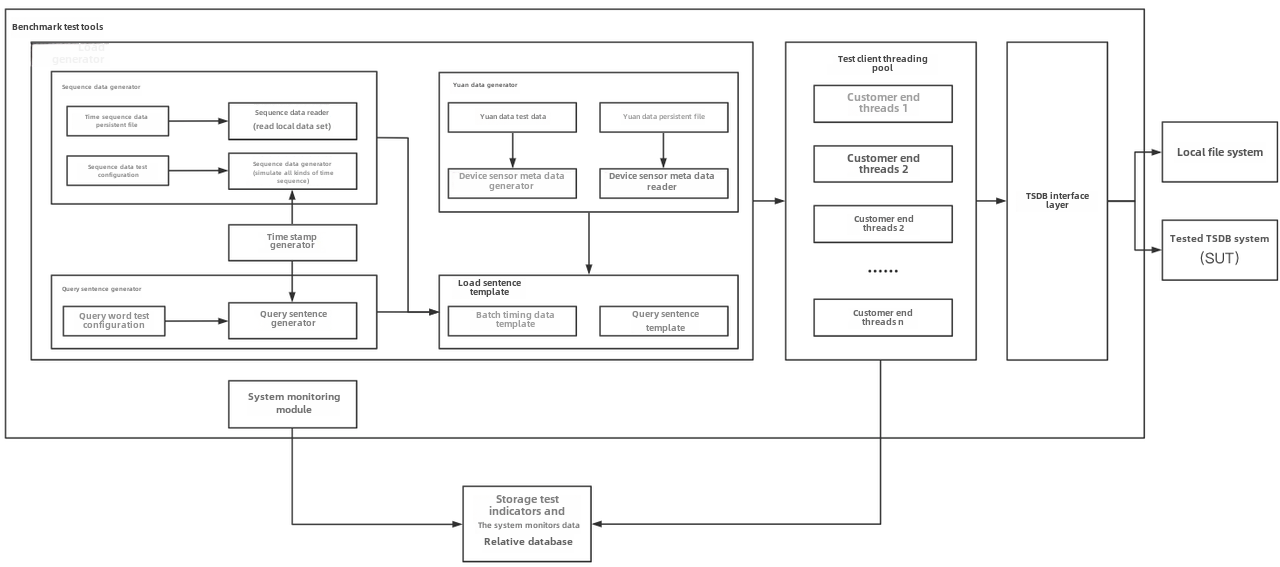
IoT Benchmark is a benchmark testing tool for time-series databases and real-time databases in Industrial Internet of Things (IIoT) scenarios. This manual introduces the tool's main capabilities, supported databases, and basic usage. The installation, configuration, and test examples primarily use IoTDB 2.0.x and cover both the tree model and the table model.
1. Basic Overview
IoT Benchmark can generate periodic time-series data based on configuration, perform writes and queries against a database, and collect metrics such as throughput, latency, and success rate. Its main capabilities include:
Cross-platform operation: supports Linux, macOS, and Windows.
Multiple workloads: supports write-only, query-only, and mixed read/write workloads.
Dataset generation: generated data can be saved to disk for repeated testing.
Correctness verification: datasets can be loaded from disk to verify write and query correctness.
Multiple database support: tests can be performed against various time-series databases and real-time databases. IoTDB 2.0.x supports JDBC, REST, and multiple Session write methods.
Result persistence: test processes and results can be saved to files, CSV, MySQL, or IoTDB.
Test extensions: supports scenarios such as out-of-order writes, batch writes, cluster load testing, dual writes for comparison, and result visualization.
1.1 Supported Databases, Versions, and Access Methods
IoT Benchmark supports the following databases and versions. During testing, use DB_SWITCH to select the corresponding database, version, and connection or write method.
| Database | Supported Version | DB_SWITCH |
|---|---|---|
| IoTDB | v1.x | IoTDB-130-JDBC, IoTDB-130-REST, IoTDB-130-SESSION_BY_TABLET, IoTDB-130-SESSION_BY_RECORD, IoTDB-130-SESSION_BY_RECORDS |
| IoTDB | v2.x | IoTDB-200-JDBC, IoTDB-200-REST, IoTDB-200-SESSION_BY_TABLET, IoTDB-200-SESSION_BY_RECORD, IoTDB-200-SESSION_BY_RECORDS |
| InfluxDB | v1.x | InfluxDB |
| InfluxDB | v2.x | InfluxDB-2.x |
| QuestDB | v6.0.7 | QuestDB |
| Microsoft SQL Server | 2016 SP2 | MSSQLSERVER |
| VictoriaMetrics | v1.64.0 | VictoriaMetrics |
| SQLite | — | SQLite |
| OpenTSDB | 2.4.1 | OpenTSDB |
| KairosDB | — | KairosDB |
| TimescaleDB | — | TimescaleDB |
| TimescaleDB Cluster | Cluster | TimescaleDB-Cluster |
| TDengine | 2.2.0.2 | TDengine |
| TDengine | 3.0.1 | TDengine-3 |
| DolphinDB | v2.x | DolphinDB-2-MTW, DolphinDB-2-PTA |
| DolphinDB | v3.x | DolphinDB-3-MTW, DolphinDB-3-PTA |
| CnosDB | — | CnosDB |
Notes:
IoTDB access methods include JDBC, REST, Session by Tablet, Session by Record, and Session by Records.
For DolphinDB,
MTWmeansMultithreadedTableWriter, which buffers writes by row;PTAmeansPartitionedTableAppender, which appends an entire table in columnar batches.Database versions, drivers, and servers must be compatible with one another. When using other databases, configure the corresponding connection and extension parameters.
1.2 IoTDB 2.0.x Access Methods
The following installation, configuration, and examples primarily use IoTDB 2.0.x. The supported access methods are listed below.
| Access Method | DB_SWITCH | Description |
|---|---|---|
| JDBC | IoTDB-200-JDBC | Performs writes and queries through JDBC |
| REST | IoTDB-200-REST | Performs tests through the IoTDB REST interface |
| Session by Tablet | IoTDB-200-SESSION_BY_TABLET | Uses Tablet for batch writes |
| Session by Record | IoTDB-200-SESSION_BY_RECORD | Writes records one at a time |
| Session by Records | IoTDB-200-SESSION_BY_RECORDS | Writes multiple records in batches |
IoTDB-200-SESSION_BY_TABLET is suitable for batch write tests.
2. Installation and Execution
This chapter uses IoTDB 2.0.x as the database under test.
2.1 Prerequisites
Before using IoT Benchmark, prepare:
Java 17.
Maven.
An installed and running IoTDB 2.0.x instance.
Sufficient client CPU, memory, disk, and network resources.
Environment notes:
Linux or macOS is recommended for running tests.
On Windows, use
benchmark.batin the installation package root directory to start a test.On Linux and macOS, use
benchmark.shto start a test.Some system information collection capabilities in CSV recording mode are supported only on Linux.
Note: Do not deploy IoT Benchmark and the IoTDB instance under test in environments where they compete for resources. For formal performance testing, use separate servers and stop unrelated services.
2.2 Obtaining IoT Benchmark
- Download a release package
Download a release package matching the test target from IoT Benchmark Releases, and extract it for use.
- Build from source
Clone the repository:
git clone https://github.com/thulab/iot-benchmark.git
cd iot-benchmark
Run the following command in the project root directory:
mvn clean package -Dmaven.test.skip=trueAfter the build is complete, the IoTDB 2.0.x package is located at:
iotdb-2.0/target/iot-benchmark-iotdb-2.0/iot-benchmark-iotdb-2.0Enter the installation directory:
cd iotdb-2.0/target/iot-benchmark-iotdb-2.0/iot-benchmark-iotdb-2.02.3 Package Structure
Common files and directories in the installation package are listed below.
| Name | Purpose |
|---|---|
benchmark.sh | Startup script for Linux and macOS |
benchmark.bat | Startup script for Windows |
conf/config.properties | Test scenario configuration file |
lib/ | Runtime dependencies |
logs/ | Test logs, generated after the first run |
data/ | Dataset or persisted result directory, generated according to the work mode and persistence configuration |
2.4 Running a Test
- Start IoTDB
First, start the target IoTDB 2.0.x instance and verify that the client can access its service port. The default native interface port is 6667.
- Modify the configuration
Edit
conf/config.properties.Minimal connection configuration example:
DB_SWITCH=IoTDB-200-SESSION_BY_TABLET
IoTDB_DIALECT_MODE=tree
HOST=127.0.0.1
PORT=6667
USERNAME=root
PASSWORD=root
DB_NAME=test- To use the table model, change the setting to:
IoTDB_DIALECT_MODE=table- If REST is selected:
DB_SWITCH=IoTDB-200-REST
REST_PORT=18080
REST_AUTHORIZATION=Basic cm9vdDpyb290
REST_AUTHORIZATION configures the Basic Authentication information for the REST interface. The example uses the username root and password root.
- Check RPC compression compatibility
IoT Benchmark 2.0 enables IoTDB RPC compression by default:
ENABLE_IOTDB_RPC_COMPRESSION=trueThis feature requires IoTDB 2.0.6 or later. When testing an IoTDB 2.0.x version earlier than 2.0.6, set:
ENABLE_IOTDB_RPC_COMPRESSION=falseThrift compression is a separate configuration. If it is enabled:
ENABLE_THRIFT_COMPRESSION=trueAlso set the following in IoTDB's iotdb-datanode.properties:
dn_rpc_thrift_compression_enable=true- Start Benchmark
On Linux or macOS:
./benchmark.shOn Windows:
benchmark.batDuring the test, progress is periodically printed to the terminal. When the test completes, the main configurations, execution time, result matrix, and latency matrix are displayed.
2.5 Understanding the Results
Test execution information is written to the logs folder in the installation directory. Whether CSV files are generated or results are written to a result database depends on parameters such as TEST_DATA_PERSISTENCE.
- Result matrix
The result matrix reports the following metrics by operation type:
| Metric | Description |
|---|---|
okOperation | Number of successfully executed requests or SQL statements |
okPoint | Number of successfully written data points, or data points successfully returned by queries |
failOperation | Number of failed requests or SQL statements |
failPoint | Number of data points that failed to be written; usually 0 for query operations |
throughput | Throughput, usually equal to okPoint / Test elapsed time |
The main operation names in the output include:
INGESTIONPRECISE_POINTTIME_RANGEVALUE_RANGEAGG_RANGEAGG_VALUEAGG_RANGE_VALUEGROUP_BYLATEST_POINTRANGE_QUERY_DESCVALUE_RANGE_QUERY_DESCGROUP_BY_DESCSET_OP_QUERY
- Latency matrix
The latency matrix is measured in milliseconds. Common fields are listed below.
| Metric | Description |
|---|---|
AVG | Average latency |
MIN | Minimum latency |
P10, P25, MEDIAN | Lower percentiles and median latency |
P75, P90, P95 | Higher-percentile latency |
P99, P999 | Tail latency |
MAX | Maximum latency |
SLOWEST_THREAD | Largest cumulative operation time among client threads |
The test results also report metadata creation time and Test elapsed time, which excludes metadata creation. When comparing tests, ensure that the hardware, data volume, number of clients, compression configuration, and cache state are consistent across runs.
- Output example
After the test completes, the terminal displays the main configurations, execution time, result matrix, and latency matrix. The following is truncated output from a write-only test:
----------------------Main Configurations----------------------
BENCHMARK_WORK_MODE=testWithDefaultPath
DB_SWITCH=IoTDB-200-SESSION_BY_TABLET
HOST=[127.0.0.1]

GROUP_NUMBER=10
DEVICE_NUMBER=50
SENSOR_NUMBER=500
SCHEMA_CLIENT_NUMBER=20
DATA_CLIENT_NUMBER=20

OPERATION_PROPORTION=1:0:0:0:0:0:0:0:0:0:0:0:0
LOOP=10000
BATCH_SIZE_PER_WRITE=100
---------------------------------------------------------------

Create schema cost 0.30 second
Test elapsed time (not include schema creation): 1238.79 second

----------------------------------------------------------Result Matrix----------------------------------------------------------
Operation   okOperation   okPoint       failOperation   failPoint   throughput(point/s)
INGESTION   500000        25000000000   0               0           20180954.09
---------------------------------------------------------------------------------------------------------------------------------

----------------------------------------------------------Latency (ms) Matrix----------------------------------------------------
Operation   AVG    MIN   P10   P25   MEDIAN   P75   P90   P95   P99      P999      MAX      SLOWEST_THREAD
INGESTION   37.78  1.67  2.02  2.29  2.86     4.14  5.62  7.43  759.69   5799.89   8309.40  1227561.44
---------------------------------------------------------------------------------------------------------------------------------
The output shows that:
Metadata creation took
0.30seconds, and the actual test took1238.79seconds.A total of
500000write operations successfully wrote25000000000data points.Both
failOperationandfailPointare0, indicating that no write failures were recorded during this test.Write throughput was
20180954.09points per second.Average latency was
37.78ms, P95 latency was7.43ms, P99 latency was759.69ms, and maximum latency was8309.40ms.SLOWEST_THREADis the cumulative operation time of the slowest client thread, not the latency of a single request.
The values in this example are only intended to demonstrate the output format. Actual results depend on hardware resources, network conditions, IoTDB configuration, data scale, and test parameters.
3. Main Parameters
3.1 IoTDB Data Model
IoTDB 2.0.x supports the tree model and the table model. Select the model using:
IoTDB_DIALECT_MODE=treeor:
IoTDB_DIALECT_MODE=tableThe following constraints apply:
An IoTDB instance can use only one SQL dialect in a single test.
The tree model requires
DEVICE_NUMBER >= GROUP_NUMBER.In the table model, the number of devices must be a multiple of the number of tables, and the number of tables must be a multiple of the number of databases.
In the table model, the number of data clients must be a multiple of the number of tables.
Common model parameters:
| Parameter | Example | Description |
|---|---|---|
IoTDB_DIALECT_MODE | tree | tree or table |
GROUP_NUMBER | 1 | Number of databases; corresponds to the number of databases in the tree model |
IoTDB_TABLE_NUMBER | 1 | Number of tables created in the table model |
IoTDB_TABLE_NAME_PREFIX | table_ | Table name prefix |
TABLE_TIME_COLUMN | time | Name of the time column in the table model |
IoTDB_TABLE_WRITABLE_VIEW | false | Whether to create and use writable views |
3.2 Work Modes
Use BENCHMARK_WORK_MODE to select a work mode.
| Mode | Configuration Value | Description |
|---|---|---|
| Regular test mode | testWithDefaultPath | Runs a write, query, or mixed workload |
| Data generation mode | generateDataMode | Saves the dataset generated by Benchmark to FILE_PATH |
| Correctness write mode | verificationWriteMode | Loads a dataset from FILE_PATH and writes it to the database |
| Correctness query mode | verificationQueryMode | Loads a dataset and compares it with database query results |
Example:
BENCHMARK_WORK_MODE=testWithDefaultPathBefore using the correctness write and query modes, use generateDataMode to generate a reusable dataset.
3.3 Server Connection Information
| Parameter | Example | Description |
|---|---|---|
DB_SWITCH | IoTDB-200-SESSION_BY_TABLET | Database version and connection method |
HOST | 127.0.0.1 | IoTDB address; separate multiple addresses with commas |
PORT | 6667 | Native service port; the number of ports must match the number of HOST entries |
USERNAME | root | Username |
PASSWORD | root | Password |
DB_NAME | test | Name of the database used for testing |
REST_PORT | 18080 | REST service port |
REST_AUTHORIZATION | Basic cm9vdDpyb290 | REST authorization header |
ENABLE_AUTO_FETCH | false | Whether Session automatically refreshes the DataNode list |
Data cleanup parameters:
IS_DELETE_DATA=false
INIT_WAIT_TIME=1000
Warning:
IS_DELETE_DATA=trueclears test data from the target database before the test starts. Enable it only in a dedicated test environment, and verifyHOST,PORT,DB_NAME, and account permissions before execution.
3.4 Write Scenarios
- Data scale and clients
| Parameter | Example | Description |
|---|---|---|
DEVICE_NUMBER | 100 | Total number of devices |
SENSOR_NUMBER | 10 | Number of measurements per device; number of measurement columns in the table model |
GROUP_NUMBER | 1 | Number of IoTDB databases |
SCHEMA_CLIENT_NUMBER | 5 | Number of clients that register metadata |
DATA_CLIENT_NUMBER | 10 | Number of clients that perform data reads and writes |
IS_CLIENT_BIND | true | Whether devices are bound to clients |
REAL_INSERT_RATE | 1.0 | Proportion of devices that actually participate in writes |
IS_SENSOR_TS_ALIGNMENT | true | Whether measurement timestamps under the same device are aligned |
- Batch writes
| Parameter | Example | Description |
|---|---|---|
BATCH_SIZE_PER_WRITE | 100 | Number of data rows written per device in each batch |
DEVICE_NUM_PER_WRITE | 1 | Number of devices involved in each batch write |
CREATE_SCHEMA | true | Whether to create metadata before writing |
START_TIME | 2022-01-01T00:00:00+08:00 | Start time for generated data |
The number of data points in a single batch is:
DEVICE_NUM_PER_WRITE × SENSOR_NUMBER × BATCH_SIZE_PER_WRITEDEVICE_NUM_PER_WRITE must evenly divide the number of devices assigned to a single data client. In the table model, the divisibility constraints among the number of devices, number of tables, and devices per batch must also be satisfied.
- Write pacing
| Parameter | Example | Description |
|---|---|---|
POINT_STEP | 5000 | Fixed interval between adjacent generated timestamps |
OP_MIN_INTERVAL | 0 | Minimum interval for each loop, in ms |
OP_MIN_INTERVAL_RANDOM | false | Whether to randomly select an interval from [0, OP_MIN_INTERVAL) |
INTERVAL_BETWEEN_WRITE_BATCH | 0 | Minimum interval between adjacent batches in the same loop, in ms |
TIMESTAMP_PRECISION | ms | Timestamp precision |
Special values of OP_MIN_INTERVAL:
0: does not limit the loop interval.-1: usesPOINT_STEPas the minimum interval.Positive integer: if the current loop takes less than this value, waits for the remaining time.
- Out-of-order writes
IS_OUT_OF_ORDER=false
OUT_OF_ORDER_MODE=POISSON
OUT_OF_ORDER_RATIO=0.5
IS_REGULAR_FREQUENCY=true
Supported out-of-order modes include:
POISSON: generates out-of-order timestamps according to a Poisson distribution.BATCH: generates out-of-order data in batches.
- Data types
INSERT_DATATYPE_PROPORTION=1:1:1:1:1:1:0:0:0:0:0The order of the entries is:
BOOLEAN:INT32:INT64:FLOAT:DOUBLE:TEXT:STRING:BLOB:TIMESTAMP:DATE:OBJECTEach value represents the proportion of the corresponding data type.
3.5 Query Scenarios
| Parameter | Example | Description |
|---|---|---|
QUERY_DEVICE_NUM | 1 | Number of devices involved in each query |
QUERY_SENSOR_NUM | 1 | Number of measurements involved in each query |
QUERY_AGGREGATE_FUN | count | Aggregation function |
STEP_SIZE | 0 | Step by which the query start time changes, in units of POINT_STEP |
QUERY_INTERVAL | 250000 | Interval between query start and end times |
QUERY_LOWER_VALUE | -5 | Lower bound of the value filter |
GROUP_BY_TIME_UNIT | 20000 | Group By window size |
QUERY_SET_OP_TYPE | union | Set operation type |
QUERY_SET_OP_NUM | 2 | Number of sub-sets in a set query; at least 2 |
IS_RECENT_QUERY | false | Whether to prioritize recently written data in mixed scenarios |
ENABLE_FIXED_QUERY | false | Whether all query threads use the same device and measurement combinations |
RESULT_ROW_LIMIT | -1 | Query result row limit; -1 means no limit |
ALIGN_BY_DEVICE | false | Whether to use Align By Device |
3.6 Operation Proportions
OPERATION_PROPORTION defines the proportions of writes and different query types. It contains 13 entries:
Write:Q1:Q2:Q3:Q4:Q5:Q6:Q7:Q8:Q9:Q10:Q11:Q12For example, write-only:
OPERATION_PROPORTION=1:0:0:0:0:0:0:0:0:0:0:0:0Precise point query only:
OPERATION_PROPORTION=0:1:0:0:0:0:0:0:0:0:0:0:0The operation types are listed below.
| Number | Operation Type | Description |
|---|---|---|
| Write | Data write | Generates and writes data according to the current write configuration |
| Q1 | Precise point query | Queries specified measurements by timestamp and device |
| Q2 | Time range query | Range query restricted only by start and end times |
| Q3 | Range query with value filter | Includes both time and value filter conditions |
| Q4 | Aggregation query with time filter | Performs aggregation within a time range |
| Q5 | Aggregation query with value filter | Filters by value and aggregates over the full time range |
| Q6 | Aggregation query with time and value filters | Includes both time and value filter conditions |
| Q7 | Time-grouped aggregation query | Group By query |
| Q8 | Latest point query | Queries the latest data point of a device |
| Q9 | Descending time range query | Returns range query results in descending time order |
| Q10 | Descending range query with value filter | Filters by value and returns results in descending time order |
| Q11 | Descending time-grouped aggregation query | Descending Group By query |
| Q12 | Set operation query | Set operations such as union, intersect, or except |
Q12 is supported only by the IoTDB 2.0 table model. Each subquery in a set operation is a range query.
3.7 Test Process and Result Persistence
TEST_DATA_PERSISTENCE=NoneSupported values include:
None: does not write the test process to an external persistence medium.CSV: writes to CSV files.MySQL: writes to MySQL.IoTDB: writes to a specified IoTDB instance.
Common parameters:
| Parameter | Example | Description |
|---|---|---|
TEST_DATA_PERSISTENCE | None | Persistence method |
RECORD_SPLIT | true | Whether to split results into multiple records |
RECORD_SPLIT_MAX_LINE | 10000000 | Maximum number of records in a single table or file |
TEST_DATA_STORE_IP | 127.0.0.1 | Result database address |
TEST_DATA_STORE_PORT | 6667 | Result database port |
TEST_DATA_STORE_DB | result | Result database name |
TEST_DATA_STORE_USER | root | Result database username |
TEST_DATA_STORE_PW | root | Result database password |
REMARK | write_test | Test note used to distinguish different tests |
CSV_OUTPUT | true | Whether to write final results to CSV |
When the persistence method is CSV, records are generated in the data directory after execution; test results are usually located in data/csvOutput. Test logs are always written to logs, regardless of whether persistence is enabled.
The following parameters control log output frequency:
IS_QUIET_MODE=true
LOG_PRINT_INTERVAL=5
RESULT_PRINT_INTERVAL=3600
3.8 Automation and Cluster Testing
- Limit test duration
TEST_MAX_TIME=3600000The unit is milliseconds. A value of 0 means no limit. This parameter does not include the time spent pre-registering metadata.
- Multi-Benchmark cluster load testing
Use the same overall data scale configuration on multiple client machines, and set:
BENCHMARK_CLUSTER=true
BENCHMARK_INDEX=0
Each Benchmark instance must use a different BENCHMARK_INDEX, such as 0, 1, and 2 in sequence. All clients should use consistent database connections, data scales, operation proportions, and other configurations.
- Dual-write testing
IoT Benchmark can write the same data to two different databases for comparison:
IS_DOUBLE_WRITE=true
ANOTHER_DB_SWITCH=<another database type>
ANOTHER_HOST=127.0.0.1
ANOTHER_PORT=6667
ANOTHER_USERNAME=root
ANOTHER_PASSWORD=root
ANOTHER_DB_NAME=test
Dual-write mode does not support comparisons between different versions of the same database, or direct comparisons between the IoTDB tree model and table model.
4. Examples
This section uses small datasets to demonstrate the basic process. For formal performance testing, increase the number of devices, measurements, clients, and loops according to the target business model, and perform multiple warm-up and repeated test runs.
4.1 Write Test Example
Test objective: use 10 data clients to simulate 100 devices, each containing 10 measurements, and perform a write-only test.
Example configuration:
# Database connection
DB_SWITCH=IoTDB-200-SESSION_BY_TABLET
IoTDB_DIALECT_MODE=tree
HOST=127.0.0.1
PORT=6667
USERNAME=root
PASSWORD=root
DB_NAME=test

# Safety setting: do not automatically delete existing data by default
IS_DELETE_DATA=false

# Work mode
BENCHMARK_WORK_MODE=testWithDefaultPath
OPERATION_PROPORTION=1:0:0:0:0:0:0:0:0:0:0:0:0

# Data scale
GROUP_NUMBER=1
DEVICE_NUMBER=100
SENSOR_NUMBER=10
SCHEMA_CLIENT_NUMBER=5
DATA_CLIENT_NUMBER=10
IS_SENSOR_TS_ALIGNMENT=true

# Write configuration
CREATE_SCHEMA=true
BATCH_SIZE_PER_WRITE=10
DEVICE_NUM_PER_WRITE=1
LOOP=100
POINT_STEP=1000
OP_MIN_INTERVAL=0
START_TIME=2026-01-01T00:00:00+08:00
INSERT_DATATYPE_PROPORTION=1:1:1:1:1:1:0:0:0:0:0

# Can be enabled for IoTDB 2.0.6 and later
ENABLE_IOTDB_RPC_COMPRESSION=true

# Output
TEST_DATA_PERSISTENCE=None
CSV_OUTPUT=true
REMARK=iotdb_2_write_test
Start the test:
./benchmark.shAfter completion, focus on:
okPointandfailPointforINGESTION.throughput.AVG,P95,P99, andMAXlatency.Whether connection timeouts, write failures, or server exceptions are present in the logs.
4.2 Query Test Example
Before running a query test, ensure that the target database contains data matching the query configuration. It is recommended to reuse data generated by the write test and disable automatic data deletion and metadata creation.
The following example runs multiple query types:
DB_SWITCH=IoTDB-200-SESSION_BY_TABLET
IoTDB_DIALECT_MODE=tree
HOST=127.0.0.1
PORT=6667
USERNAME=root
PASSWORD=root
DB_NAME=test

IS_DELETE_DATA=false
CREATE_SCHEMA=false
BENCHMARK_WORK_MODE=testWithDefaultPath

GROUP_NUMBER=1
DEVICE_NUMBER=100
SENSOR_NUMBER=10
SCHEMA_CLIENT_NUMBER=1
DATA_CLIENT_NUMBER=10

# Do not perform writes; Q1-Q11 have equal proportions; the tree model does not use Q12
OPERATION_PROPORTION=0:1:1:1:1:1:1:1:1:1:1:1:0
LOOP=100

QUERY_DEVICE_NUM=2
QUERY_SENSOR_NUM=2
QUERY_AGGREGATE_FUN=count
STEP_SIZE=1
QUERY_INTERVAL=250000
QUERY_LOWER_VALUE=-5
GROUP_BY_TIME_UNIT=20000
To test set queries in the table model, switch the dialect to table and assign a proportion to Q12:
IoTDB_DIALECT_MODE=table
OPERATION_PROPORTION=0:0:0:0:0:0:0:0:0:0:0:0:1
QUERY_SET_OP_TYPE=union
QUERY_SET_OP_NUM=2
4.3 Other Configuration Examples
- Simulate an actual write rate
Set the minimum interval of each loop to the data timestamp interval:
POINT_STEP=1000
OP_MIN_INTERVAL=-1
To distribute write requests evenly within a loop, use:
INTERVAL_BETWEEN_WRITE_BATCH=100- Specify test duration
Test for one hour:
TEST_MAX_TIME=3600000Ensure that LOOP is sufficiently large; otherwise, the test may end when the loop count is exhausted.
- Control generated data patterns
LINE_RATIO=1
SIN_RATIO=1
SQUARE_RATIO=1
RANDOM_RATIO=1
CONSTANT_RATIO=1
DATA_SEED=666
STRING_LENGTH=10
DOUBLE_LENGTH=2
Fixing DATA_SEED helps generate reproducible data across multiple test runs.