
AINode
AINode
AINode is a native IoTDB node that supports the registration, management, and invocation of time-series related models. It includes industry-leading self-developed time-series large models, such as the Timer series models developed by Tsinghua University. These models can be called using standard SQL statements, enabling millisecond-level real-time inference for time series data, supporting applications such as time series trend prediction, missing value imputation, and anomaly detection.
The system architecture is shown in the following figure:
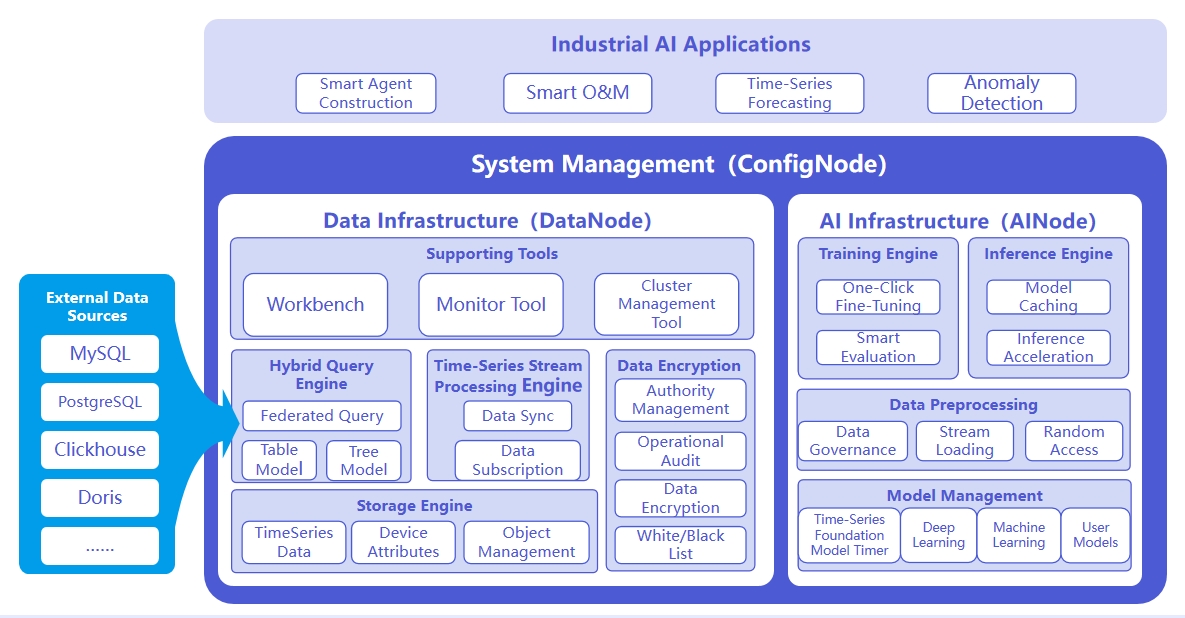
The responsibilities of the three nodes are as follows:
- ConfigNode: Responsible for distributed node management and load balancing.
- DataNode: Responsible for receiving and parsing users' SQL requests; responsible for storing time series data; responsible for data preprocessing calculations.
- AINode: Responsible for the management and use of time series models.
1. Advantages
Compared to building a machine learning service separately, it has the following advantages:
- Simple and Easy to Use: No need to use Python or Java programming. Machine learning model management and inference can be completed using SQL statements. For example, creating a model can use the CREATE MODEL statement, and using a model for inference can use the
CALL INFERENCE(...)statement, making it simpler and more convenient. - Avoid Data Migration: Using IoTDB's native machine learning can directly apply data stored in IoTDB to machine learning models for inference, without moving data to a separate machine learning service platform. This accelerates data processing, improves security, and reduces costs.
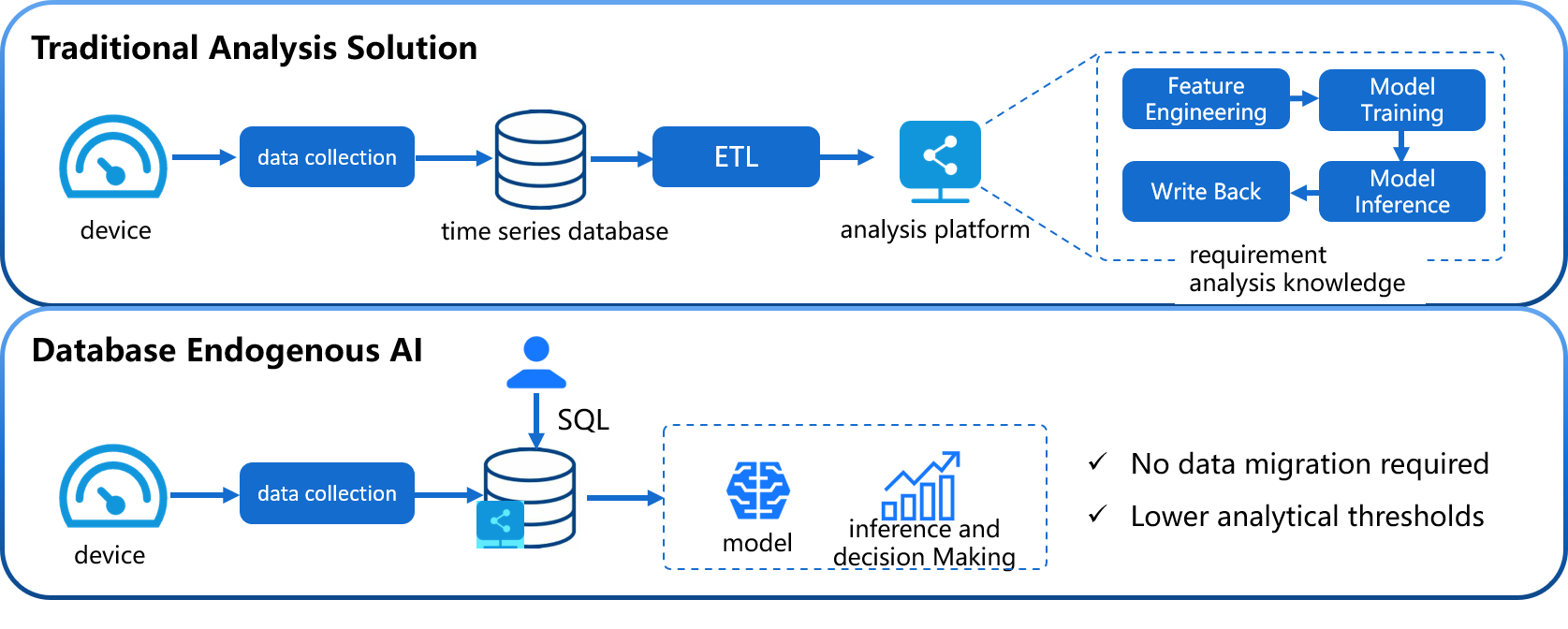
- Built-in Advanced Algorithms: Supports industry-leading machine learning analysis algorithms, covering typical time series analysis tasks, and empowering time series databases with native data analysis capabilities. For example:
- Time Series Forecasting: Learn change patterns from past time series data; based on given past observations, output the most likely future sequence predictions.
- Anomaly Detection for Time Series: Detect and identify anomalies in given time series data, helping to discover abnormal behavior in time series.
2. Basic Concepts
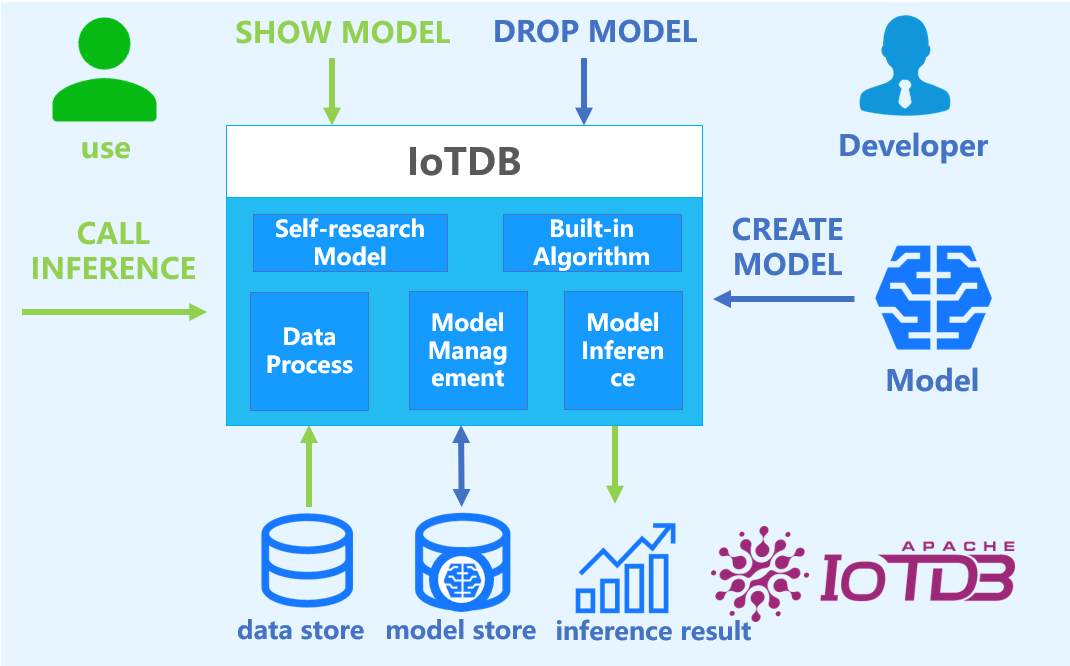
- Model: Machine learning model, which takes time series data as input and outputs the results or decisions of the analysis task. Model is the basic management unit of AINode, supporting model management including creation (registration), deletion, query, and usage (inference).
- Create: Load external designed or trained model files or algorithms into AINode, managed and used uniformly by IoTDB.
- Inference: Use the created model to complete the time series analysis task applicable to the model on the specified time series data.
- Built-in: AINode comes with common time series analysis scenario (e.g., prediction and anomaly detection) machine learning algorithms or self-developed models.
3. Installation and Deployment
AINode deployment can be referenced in the document AINode Deployment.
4. Usage Guide
AINode supports two major functions: model inference and model management (registration, viewing, deletion, loading, unloading, etc.). The following sections will provide detailed instructions.
4.1 Model Inference
SQL syntax:
call inference(<model_id>,inputSql,(<parameterName>=<parameterValue>)*)After completing the model registration (built-in models do not require the registration process), the inference function of the model can be used by calling the inference function with the call keyword. The corresponding parameter descriptions are as follows:
model_id: Corresponds to an already registered model
sql: SQL query statement, the result of the query is used as the input for model inference. The dimensions of the query results (rows and columns) need to match the size specified in the model's config. (It is recommended not to use the
SELECT *clause in this sql, because in IoTDB,*does not sort the columns, so the column order is undefined. It is recommended to useSELECT s0,s1to ensure the column order matches the expected input of the model.)parameterName/parameterValue: currently supports:
Parameter Name Parameter Type Parameter Description Default Value generateTime boolean Whether to include a timestamp column in the result false outputLength int Specifies the length of the output result 96
Notes:
- The prerequisite for using built-in time series large models for inference is that the corresponding model weights are locally stored, with the directory being
/IOTDB_AINODE_HOME/data/ainode/models/builtin/model_id/. If the local model weights are not present, they will be automatically pulled from HuggingFace. Please ensure that the local environment can directly access HuggingFace. - In deep learning applications, time stamp derived features (the time column in the data) are often used as covariates together with the input to the model to improve model performance. However, the time column is generally not included in the model's output results. To ensure generality, the model inference results only correspond to the model's true output. If the model does not output a time column, the result will not include it.
Example
Sample data ETTh-tree
Here is an example of using the sundial model for inference. The input is 96 rows, and the output is 48 rows. We use SQL to perform the inference.
IoTDB> select OT from root.db.**
+-----------------------------+---------------+
|                         Time|root.db.etth.OT|
+-----------------------------+---------------+
|2016-07-01T00:00:00.000+08:00|         30.531|
|2016-07-01T01:00:00.000+08:00|         27.787|
|2016-07-01T02:00:00.000+08:00|         27.787|
|2016-07-01T03:00:00.000+08:00|         25.044|
|2016-07-01T04:00:00.000+08:00|         21.948|
|  ......                     |        ...... |
|2016-07-04T19:00:00.000+08:00|         29.546|
|2016-07-04T20:00:00.000+08:00|         29.475|
|2016-07-04T21:00:00.000+08:00|         29.264|
|2016-07-04T22:00:00.000+08:00|         30.953|
|2016-07-04T23:00:00.000+08:00|         31.726|
+-----------------------------+---------------+
Total line number = 96

IoTDB> call inference(sundial,"select OT from root.db.**", generateTime=True, outputLength=48)
+-----------------------------+------------------+
|                         Time|            output|
+-----------------------------+------------------+
|2016-07-04T23:00:00.000+08:00|30.537494659423828|
|2016-07-04T23:59:22.500+08:00|29.619892120361328|
|2016-07-05T00:58:45.000+08:00|28.815832138061523|
|2016-07-05T01:58:07.500+08:00| 27.91131019592285|
|2016-07-05T02:57:30.000+08:00|26.893848419189453|
|  ......                     | ......           |
|2016-07-06T17:33:07.500+08:00| 24.40607261657715|
|2016-07-06T18:32:30.000+08:00| 25.00441551208496|
|2016-07-06T19:31:52.500+08:00|24.907312393188477|
|2016-07-06T20:31:15.000+08:00|25.156436920166016|
|2016-07-06T21:30:37.500+08:00|25.335433959960938|
+-----------------------------+------------------+
Total line number = 48
4.2 Register Custom Models
The following requirements must be met for Transformers models to be registered in AINode:
AINode currently uses transformers v4.56.2, so when building the model, avoid inheriting from low versions (<4.50) interfaces;
The model must inherit from a type of AINode inference task pipeline (currently supports forecast pipeline):
- iotdb-core/ainode/iotdb/ainode/core/inference/pipeline/basic_pipeline.py
Before V2.0.10
class BasicPipeline(ABC):
    def __init__(self, model_id, **model_kwargs):
        self.model_info = model_info
        self.device = model_kwargs.get("device", "cpu")
        self.model = load_model(model_info, device_map=self.device, **model_kwargs)

    @abstractmethod
    def preprocess(self, inputs, **infer_kwargs):
        """
        Preprocess the input data before the inference task starts, including shape validation and numerical conversion.
        """
        pass

    @abstractmethod
    def postprocess(self, output, **infer_kwargs):
        """
        Postprocess the output results after the inference task is completed.
        """
        pass


class ForecastPipeline(BasicPipeline):
    def __init__(self, model_info, **model_kwargs):
        super().__init__(model_info, model_kwargs=model_kwargs)

    def preprocess(self, inputs: list[dict[str, dict[str, torch.Tensor] | torch.Tensor]], **infer_kwargs):
        """
        Preprocess the input data before passing it to the model for inference, validating the shape and type of the input data.

        Args:
            inputs (list[dict]):
                Input data, a list of dictionaries, each dictionary contains:
                    - 'targets': Tensor with shape (input_length,) or (target_count, input_length).
                    - 'past_covariates': Optional, dictionary of tensors, each tensor with shape (input_length,).
                    - 'future_covariates': Optional, dictionary of tensors, each tensor with shape (input_length,).

            infer_kwargs (dict, optional): Additional keyword arguments for inference, such as:
                - `output_length`(int): Used to validate the validity of 'future_covariates' if provided.

        Raises:
            ValueError: If the input format is invalid (e.g., missing keys, invalid tensor shapes).

        Returns:
            Preprocessed and validated input data that can be directly used for model inference.
        """
        pass

    def forecast(self, inputs, **infer_kwargs):
        """
        Perform forecasting on the given inputs.

        Parameters:
            inputs: Input data for forecasting. The type and structure depend on the specific model implementation.
            **infer_kwargs: Additional inference parameters, e.g.:
                - `output_length`(int): The number of time points the model should generate.

        Returns:
            Forecast output, the specific form depends on the specific model implementation.
        """
        pass

    def postprocess(self, outputs: list[torch.Tensor], **infer_kwargs) -> list[torch.Tensor]:
        """
        Postprocess the model outputs after inference, validating the shape of the output data and ensuring it meets the expected dimensions.

        Args:
            outputs:
                Model outputs, a list of 2D tensors, each tensor with shape `[target_count, output_length]`.

        Raises:
            InferenceModelInternalException: If the output tensor shape is invalid (e.g., incorrect dimensions).
            ValueError: If the output format is incorrect.

        Returns:
            list[torch.Tensor]:
                Postprocessed outputs, which will be a list of 2D tensors.
        """
        pass
From V2.0.10 onwards
class BasicPipeline(ABC):
    def __init__(self, model_id, **model_kwargs):
        self.model_info = model_info
        self.device = model_kwargs.get("device", "cpu")
        self.model = load_model(model_info, device_map=self.device, **model_kwargs)

    @abstractmethod
    def preprocess(self, inputs, **infer_kwargs):
        """
        Preprocess the input data before the inference task starts, including shape validation and numerical conversion.
        """
        pass

    @abstractmethod
    def postprocess(self, output, **infer_kwargs):
        """
        Postprocess the output results after the inference task is completed.
        """
        pass


class ForecastPipeline(BasicPipeline):
    def __init__(self, model_info, **model_kwargs):
        super().__init__(model_info, model_kwargs=model_kwargs)

    def _preprocess(
        self,
        inputs: list[dict[str, dict[str, torch.Tensor] | torch.Tensor]],
        **infer_kwargs,
    ):
        """
        Preprocess the input data before passing it to the model for inference, validating the shape and type of the input data.

        Args:
            inputs (list[dict[str, dict[str, torch.Tensor] | torch.Tensor]]):
                Input data, a list of dictionaries, each dictionary contains:
                    - 'targets': Tensor with shape (input_length,) or (target_count, input_length).
                    - 'past_covariates': Optional, dictionary of tensors, each tensor with shape (input_length,).
                    - 'future_covariates': Optional, dictionary of tensors, each tensor with shape (input_length,).

            infer_kwargs (dict, optional): Additional keyword arguments for inference, such as:
                - `output_length`(int): Used to validate the validity of 'future_covariates' if provided.

        Raises:
            ValueError: If the input format is invalid (e.g., missing keys, invalid tensor shapes).

        Returns:
            Preprocessed and validated input data that can be directly used for model inference.
        """
        pass

    def forecast(self, inputs, **infer_kwargs):
        """
        Perform forecasting on the given inputs.

        Parameters:
            inputs: Input data for forecasting. The type and structure depend on the specific model implementation.
            **infer_kwargs: Additional inference parameters, e.g.:
                - `output_length`(int): The number of time points the model should generate.

        Returns:
            Forecast output, the specific form depends on the specific model implementation.
        """
        pass

    def _postprocess(self, outputs, **infer_kwargs) -> list[torch.Tensor]:
        """
        Postprocess the model outputs after inference, validating the shape of the output data and ensuring it meets the expected dimensions.

        Args:
            outputs:
                Model outputs, a list of 2D tensors, each tensor with shape `[target_count, output_length]`.

        Raises:
            InferenceModelInternalException: If the output tensor shape is invalid (e.g., incorrect dimensions).
            ValueError: If the output format is incorrect.

        Returns:
            list[torch.Tensor]:
                Postprocessed outputs, which will be a list of 2D tensors.
        """
        pass
Modify the model configuration file
config.jsonto ensure it contains the following fields:Before V2.0.10
{ "auto_map": { "AutoConfig": "config.Chronos2CoreConfig", // Specify the model Config class "AutoModelForCausalLM": "model.Chronos2Model" // Specify the model class }, "pipeline_cls": "pipeline_chronos2.Chronos2Pipeline", // Specify the inference pipeline for the model "model_type": "custom_t5", // Specify the model type }- The model Config class and model class must be specified via
auto_map; - The inference pipeline class must be inherited and specified;
- For built-in and user-defined models managed by AINode,
model_typealso serves as a unique non-duplicable identifier. That is, the model type to be registered must not duplicate any existing model types; models created via fine-tuning will inherit the model type of the original model.
From V2.0.10 onwards
The
model_typeparameter is not required{ "auto_map": { "AutoConfig": "config.Chronos2CoreConfig", // Specify the model Config class "AutoModelForCausalLM": "model.Chronos2Model" // Specify the model class }, "pipeline_cls": "pipeline_chronos2.Chronos2Pipeline", // Specify the inference pipeline for the model }- The model Config class and model class must be specified via
auto_map; - The inference pipeline class must be inherited and specified;
- The model Config class and model class must be specified via
Ensure the model directory to be registered contains the following files, and the model configuration file name and weight file name are not customizable:
- Model configuration file: config.json;
- Model weight file: model.safetensors;
- Model code: other .py files.
The SQL syntax for registering a custom model is as follows:
CREATE MODEL <model_id> USING URI <uri>Parameter descriptions:
- model_id: The unique identifier of the custom model; must be unique, with the following constraints:
- Allowed characters: [0-9 a-z A-Z _] (letters, numbers (not starting), underscore (not starting))
- Length limit: 2-64 characters
- Case-sensitive
- uri: The local URI address containing the model code and weights.
Example of registration:
Upload a custom Transformers model from a local path, AINode will copy the folder to the user_defined directory.
CREATE MODEL chronos2 USING URI 'file:///path/to/chronos2'After executing the SQL, the model registration process will be asynchronous. You can view the model registration status by viewing the model (see the View Model section). After the model registration is complete, you can call the specific function using normal query methods to perform model inference.
4.3 View Models
Registered models can be viewed using the view command.
SHOW MODELSIn addition to directly displaying all model information, you can specify model_id to view specific model information.
SHOW MODELS <model_id> -- Show specific model onlyThe model display result includes the following content:
| ModelId | ModelType | Category | State |
|---|---|---|---|
| Model ID | Model Type | Model Category | Model State |
Where, the State model state machine flowchart is as follows:
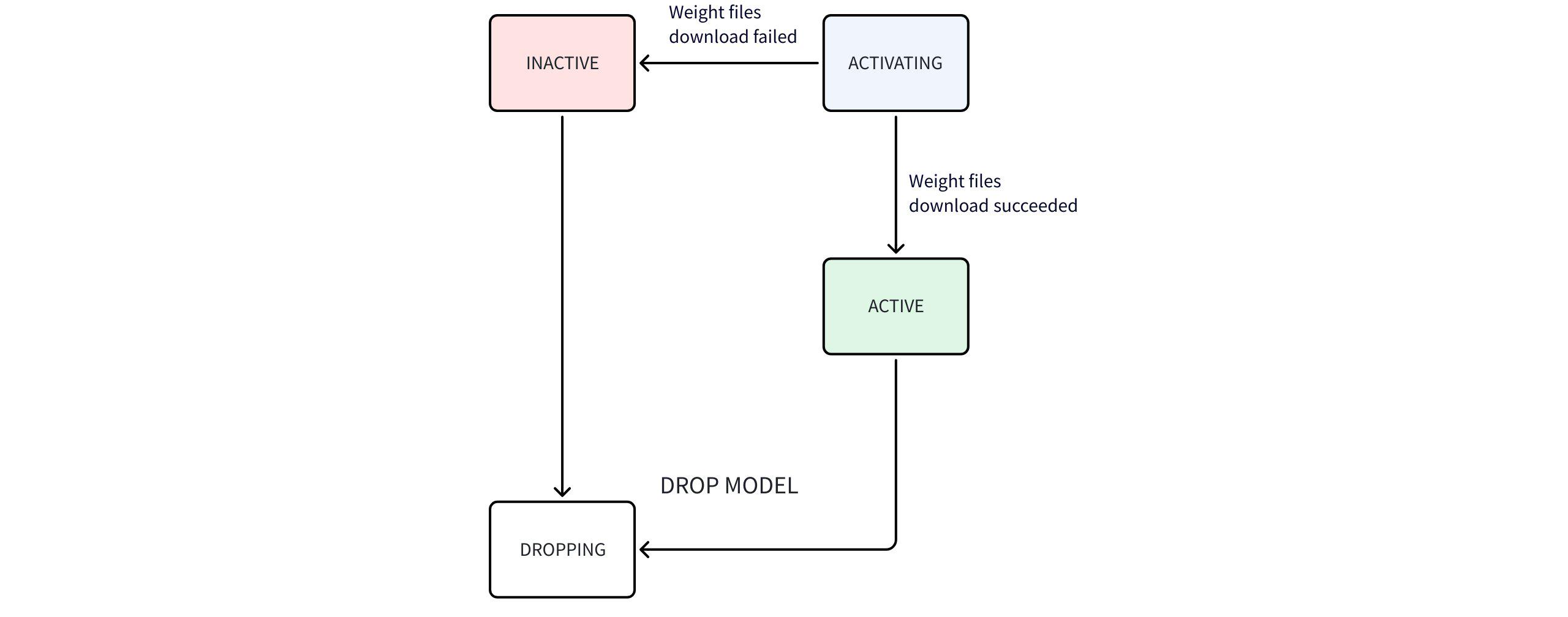
State machine flow description:
- After starting AINode, executing
show modelscommand can only view the system built-in (BUILTIN) models. - Users can import their own models, which are identified as user-defined (USER_DEFINED); AINode will try to parse the model type (ModelType) from the model configuration file. If parsing fails, this field will be displayed as empty.
- Time series large models (built-in models) weight files are not packaged with AINode, and AINode automatically downloads them when starting.
- During download, the state is ACTIVATING; after successful download, it becomes ACTIVE; if download fails, it becomes INACTIVE.
View Example
IoTDB> show models
+---------------------+--------------+--------------+-------------+
|              ModelId|     ModelType|      Category|        State|
+---------------------+--------------+--------------+-------------+
|                arima|        sktime|       builtin|       active|
|          holtwinters|        sktime|       builtin|       active|
|exponential_smoothing|        sktime|       builtin|       active|
|     naive_forecaster|        sktime|       builtin|       active|
|       stl_forecaster|        sktime|       builtin|       active|
|         gaussian_hmm|        sktime|       builtin|       active|
|              gmm_hmm|        sktime|       builtin|       active|
|                stray|        sktime|       builtin|       active|
|               custom|              |  user_defined|       active|
|             timer_xl|         timer|       builtin|   activating|
|              sundial|       sundial|       builtin|       active|
|           sundialx_1|       sundial|    fine_tuned|       active|
|           sundialx_4|       sundial|    fine_tuned|     training|
|           sundialx_5|       sundial|    fine_tuned|       failed|
|             chronos2|            t5|       builtin|     inactive|
|                 toto|          toto|       builtin|     inactive|
+---------------------+--------------+--------------+-------------+
Built-in traditional time series model introduction:
| Model Name | Core Concept | Applicable Scenario | Main Features |
|---|---|---|---|
| ARIMA (AutoRegressive Integrated Moving Average) | Combines autoregression (AR), differencing (I), and moving average (MA), used for predicting stationary time series or data that can be made stationary through differencing. | Univariate time series prediction, such as stock prices, sales, economic indicators. | 1. Suitable for linear trends and weak seasonality data. 2. Requires selecting parameters (p,d,q). 3. Sensitive to missing values. |
| Holt-Winters (Three-parameter exponential smoothing) | Based on exponential smoothing, introduces level, trend, and seasonal components, suitable for data with trend and seasonality. | Time series with clear seasonality and trend, such as monthly sales, power demand. | 1. Can handle additive or multiplicative seasonality. 2. Gives higher weight to recent data. 3. Simple to implement. |
| Exponential Smoothing (Exponential smoothing) | Uses weighted average of historical data, with weights decreasing exponentially over time, emphasizing the importance of recent observations. | Data without significant seasonality but with trend, such as short-term demand prediction. | 1. Few parameters, simple calculation. 2. Suitable for stationary or slowly changing sequences. 3. Can be extended to double or triple exponential smoothing. |
| Naive Forecaster (Naive predictor) | Uses the observation of the most recent period as the prediction for the next period, the simplest baseline model. | As a benchmark for other models or simple prediction when data has no obvious pattern. | 1. No training required. 2. Sensitive to sudden changes. 3. Seasonal naive variant can use the same period of the previous season to predict. |
| STL Forecaster (Seasonal-Trend Decomposition Forecast) | Based on STL decomposition of time series, predicts trend, seasonal, and residual components separately, then combines them. | Data with complex seasonality, trend, and non-linear patterns, such as climate data, traffic flow. | 1. Can handle non-fixed seasonality. 2. Robust to outliers. 3. After decomposition, other models can be combined to predict each component. |
| Gaussian HMM (Gaussian Hidden Markov Model) | Assumes observed data is generated by hidden states, with each state's observation probability following a Gaussian distribution. | State sequence prediction or classification, such as speech recognition, financial state identification. | 1. Suitable for time series state modeling. 2. Assumes observations are independent given the state. 3. Requires specifying the number of hidden states. |
| GMM HMM (Gaussian Mixture Hidden Markov Model) | An extension of Gaussian HMM, where each state's observation probability is described by a Gaussian Mixture Model, capturing more complex observation distributions. | Scenarios requiring multi-modal observation distributions, such as complex action recognition, biosignal analysis. | 1. More flexible than single Gaussian. 2. More parameters, higher computational complexity. 3. Requires training the number of GMM components. |
| STRAY (Anomaly Detection based on Singular Value Decomposition) | Detects anomalies in high-dimensional data through Singular Value Decomposition (SVD), commonly used for time series anomaly detection. | High-dimensional time series anomaly detection, such as sensor networks, IT system monitoring. | 1. No distribution assumption required. 2. Can handle high-dimensional data. 3. Sensitive to global anomalies, may miss local anomalies. |
Built-in time series large model introduction:
| Model Name | Core Concept | Applicable Scenario | Main Features |
|---|---|---|---|
| Timer-XL | Time series large model supporting ultra-long context, enhancing generalization capability through large-scale industrial data pre-training. | Complex industrial prediction requiring extremely long historical data, such as energy, aerospace, and transportation. | 1. Ultra-long context support, can handle tens of thousands of time points as input. 2. Multi-scenario coverage, supports non-stationary, multi-variable, and covariate prediction. 3. Pre-trained on trillions of high-quality industrial time series data. |
| Timer-Sundial | A generative foundational model based on "Transformer + TimeFlow" architecture, focusing on probabilistic prediction. | Zero-shot prediction scenarios requiring quantification of uncertainty, such as finance, supply chain, and new energy power generation. | 1. Strong zero-shot generalization capability, supports point prediction and probabilistic prediction. 2. Can flexibly analyze any statistical properties of the prediction distribution. 3. Innovative generative architecture, achieving efficient non-deterministic sample generation. |
| Chronos-2 | A general time series foundational model based on discrete tokenization paradigm, converting prediction into language modeling tasks. | Rapid zero-shot univariate prediction, and scenarios that can leverage covariates (e.g., promotions, weather) to improve results. | 1. Strong zero-shot probabilistic prediction capability. 2. Supports unified covariate modeling, but has strict input requirements: a. The set of names of future covariates must be a subset of the set of names of historical covariates; b. The length of each historical covariate must equal the length of the target variable; c. The length of each future covariate must equal the prediction length; 3. Uses an efficient encoder-style structure, balancing performance and inference speed. |
| Toto 2.0 | Uses a decoder-only Patch Transformer that alternates causal temporal attention and variable attention to jointly model the temporal and variable dimensions. | Zero-shot forecasting for multivariate time series such as observability metrics, including joint forecasting of CPU, memory, and network traffic. | 1. Supports univariate and multivariate target forecasting. 2. Outputs fixed quantiles from 0.1 to 0.9 and uses the p50 median as the point forecast. 3. Supports cached block decoding for efficient scaling to longer forecast horizons. 4. Covariates are not currently supported. |
4.4 Delete Models
For registered models, users can delete them using SQL. AINode will delete the entire folder of the corresponding model in the user_defined directory. The SQL syntax is as follows:
DROP MODEL <model_id>Specify the model_id that has been successfully registered to delete the corresponding model. Since model deletion involves model data cleanup, the operation will not be completed immediately, and the model state becomes DROPPING. Models in this state cannot be used for model inference. Note that this function does not support deleting built-in models.
4.5 Load/Unload Models
To adapt to different scenarios, AINode provides two model loading strategies:
- On-demand loading: Load the model temporarily when inference is needed, and release resources after inference. Suitable for testing or low-load scenarios.
- Persistent loading: Permanently load the model into memory (CPU) or GPU memory to support high-concurrency inference. Users only need to specify the model to load or unload via SQL, and AINode will automatically manage the number of instances. The current state of persistent models can also be viewed at any time.
The following details the loading/unloading model content:
- Configuration parameters
Support editing the following configuration items to set persistent loading related parameters.
# The ratio of device memory/GPU memory available for AINode inference
# Datatype: Float
ain_inference_memory_usage_ratio=0.4

# The memory ratio required by each instance of a loaded model, i.e., model memory * this value
# Datatype: Float
ain_inference_extra_memory_ratio=1.2- View available devices
Support using the following SQL command to view all available device IDs.
SHOW AI_DEVICESExample
IoTDB> show ai_devices
+-------------+
|     DeviceId|
+-------------+
|          cpu|
|            0|
|            1|
+-------------+- Load models
Support using the following SQL command to manually load models, and the system will automatically balance the number of model instances based on hardware resource usage.
LOAD MODEL <existing_model_id> TO DEVICES <device_id>(, <device_id>)*Parameter requirements
- existing_model_id: The specified model ID, currently only supports timer_xl and sundial.
- device_id: The location where the model is loaded.
- cpu: Load to the memory of the AINode server.
- gpu_id: Load to the corresponding GPU of the AINode server, e.g., "0, 1" means loading to the two GPUs numbered 0 and 1.
Example
LOAD MODEL sundial TO DEVICES 'cpu,0,1'- Unload models
Support using the following SQL command to manually unload all instances of a specified model, and the system will redistribute the released resources to other models.
UNLOAD MODEL <existing_model_id> FROM DEVICES <device_id>(, <device_id>)*Parameter requirements
- existing_model_id: The specified model ID, currently only supports timer_xl and sundial.
- device_id: The location where the model is loaded.
- cpu: Attempt to unload the specified model from the memory of the AINode server.
- gpu_id: Attempt to unload the specified model from the corresponding GPU of the AINode server, e.g., "0, 1" means attempting to unload from the two GPUs numbered 0 and 1.
Example
UNLOAD MODEL sundial FROM DEVICES 'cpu,0,1'- View loaded models
Support using the following SQL command to view the models that have been manually loaded. You can specify the device with device_id.
SHOW LOADED MODELS
SHOW LOADED MODELS <device_id>(, <device_id>)* # View models in specified devices
Example: sundial model loaded in memory, gpu_0, and gpu_1
IoTDB> show loaded models
+-------------+--------------+------------------+
|     DeviceId|       ModelId|  Count(instances)|
+-------------+--------------+------------------+
|          cpu|       sundial|                 4|
|            0|       sundial|                 6|
|            1|       sundial|                 6|
+-------------+--------------+------------------+
Notes:
- DeviceId: Device ID
- ModelId: Loaded model ID
- Count(instances): Number of model instances per device (automatically assigned by the system)
4.6 Introduction to Time Series Large Models
AINode currently supports multiple time series large models. For related introductions and deployment usage, refer to Time Series Large Models
5. Permission Management
When using AINode-related features, permission management can be done using IoTDB's own authentication. Users can only use model management-related features if they have the USE_MODEL permission. When using inference features, users need to have access permissions to the source sequences corresponding to the SQL used for input.
| Permission Name | Permission Scope | Administrator User (Default ROOT) | Normal User | Related to Path |
|---|---|---|---|---|
| USE_MODEL | create model / show models / drop model | √ | √ | x |
| READ_DATA | call inference | √ | √ | √ |
6. Contributing Open Source Time Series Large Models to IoTDB-AINode
Support adding new built-in models to AINode. The specific steps are as follows (using chronos2 as an example):
- Send an email to the dev@iotdb.apache.org mailing list or submit an issue in the main repository to initiate preliminary discussion
- Submit a Pull Request to the main branch
Check the open source license used by the model and declare it in the IoTDB repository.
Create a new package for the new built-in model in iotdb-core/ainode/iotdb/ainode/core/model;
- Ensure it contains the model configuration class;
- Ensure it contains the model class for executing inference tasks;
- Ensure it contains the pipeline class inheriting from AINode inference task pipeline;
root@rootMacBook-Pro model % eza --tree --level=2 .
.
├── chronos2
│   ├── __init__.py
│   ├── base.py
│   ├── chronos_bolt.py
│   ├── config.py
│   ├── dataset.py
│   ├── layers.py
│   ├── model.py
│   ├── pipeline_chronos2.py # Inheriting AINode inference task pipeline
│   └── utils.py
├── sktime
├── sundial
└── timer_xl
Add the metadata of the new model in iotdb-core/ainode/iotdb/ainode/core/model/model_info.py;
BUILTIN_HF_TRANSFORMERS_MODEL_MAP = {
    "chronos2": ModelInfo(
        model_id="chronos2", # Unique identifier of the model
        category=ModelCategory.BUILTIN, # Model category, choose BUILTIN
        state=ModelStates.INACTIVE,
        model_type="t5", # Model type, must not duplicate other builtin models
        pipeline_cls="pipeline_chronos2.Chronos2Pipeline", # Inheriting AINode inference pipeline
        repo_id="amazon/chronos-2", # [Optional] Huggingface weights
        auto_map={
            "AutoConfig": "config.Chronos2CoreConfig", # Ensure it points to the model's configuration class
            "AutoModelForCausalLM": "model.Chronos2Model", # Ensure it points to the model class for inference
        },
    ),
}
Add the corresponding model in integration-test/src/test/java/org/apache/iotdb/ainode/utils/AINodeTestUtils.java.
public static final Map<String, FakeModelInfo> BUILTIN_LTSM_MAP =
    Stream.of(
            new AbstractMap.SimpleEntry<>(
                "sundial", new FakeModelInfo("sundial", "sundial", "builtin", "active")),
            new AbstractMap.SimpleEntry<>(
                "timer_xl", new FakeModelInfo("timer_xl", "timer", "builtin", "active")),
            new AbstractMap.SimpleEntry<>(
                "chronos2", new FakeModelInfo("chronos2", "t5", "builtin", "active")))
        .collect(Collectors.toMap(Map.Entry::getKey, Map.Entry::getValue));
Submit a pull request, and only merge after passing the pipeline tests.
- Packaging and Deployment
Compile AINode to obtain the installation package.
# Command to simultaneously build IoTDB and AINode
mvn clean package -pl distribution -P with-ainode -am -DskipTests
# Command to build AINode only
mvn clean package -pl iotdb-core/ainode -P with-ainode -am -DskipTests
Ensure the model can obtain weights at runtime.
- If the model weights can be obtained online from Huggingface, ensure
repo_idis filled in; - Otherwise, manually place the model weights in
data/ainode/models/builtin/<model_id>before starting AINode or during runtime.
root@rootMacBook-Pro models % eza --tree --level=3 . . ├── __init__.py ├── builtin │ ├── __init__.py │ ├── chronos2 │ │ ├── __init__.py │ │ ├── config.json │ │ └── model.safetensors │ ├── sundial │ │ ├── __init__.py │ │ ├── config.json │ │ └── model.safetensors │ └── timer_xl │ ├── __init__.py │ ├── config.json │ └── model.safetensors └── user_defined- If the model weights can be obtained online from Huggingface, ensure
- Full Example
Full example can be referenced at https://github.com/apache/iotdb/pull/16903