
ThingsBoard
ThingsBoard
1. Product Overview
1.1 Introduction to ThingsBoard
ThingsBoard is an open-source IoT platform for device management, data collection, and visualization. It helps users rapidly develop, manage, and scale IoT applications. For details, see the ThingsBoard documentation.

1.2 ThingsBoard Integration with the IoTDB Table Model
The iotdb-thingsboard-table extension stores ThingsBoard historical telemetry, latest telemetry values, and entity attributes in the IoTDB table model. ThingsBoard can continue to read and display these data. You can choose which data types to store in IoTDB and use ThingsBoard for device management and visualization.
2. Setup
2.1 Requirements
This guide uses IoTDB 2.0.11, ThingsBoard 4.3.1.2, and iotdb-thingsboard-table 2.0.11. For later versions, check the corresponding compatibility information and adjust dependencies, configuration, and startup procedures as needed.
| Software | Example version or configuration | Purpose |
|---|---|---|
| IoTDB | 2.0.11, table model | Stores telemetry and/or attributes |
| ThingsBoard | 4.3.1.2 | Device connectivity and data management |
| JDK | 17 | Runs IoTDB and ThingsBoard |
IoTDB and ThingsBoard can run on separate hosts or containers. The ThingsBoard runtime must be able to reach the IoTDB RPC address (port 6667 by default). For initial deployment, use a dedicated test instance and test device.
2.2 Install the Prerequisites
Follow the official installation guides for ThingsBoard and IoTDB and verify that both start independently. Complete ThingsBoard installation and database initialization before connecting it to the IoTDB table model.
- For IoTDB deployment, see Standalone Deployment.
- Download ThingsBoard from the 4.3.1.2 release page, then follow its official guide to install it, configure its database, and initialize it.
If IoTDB and ThingsBoard run in separate containers, connect them to the same Docker network and use an IoTDB service name resolvable by ThingsBoard. For apache/iotdb:2.0.11-standalone, if the IoTDB service is named iotdb, set these values in its environment:
cn_seed_config_node: iotdb:10710
dn_seed_config_node: iotdb:10710
cn_internal_address: iotdb
dn_internal_address: iotdb
dn_rpc_address: iotdb
2.3 Obtain and Deploy the Extension
Get the extension. Download
iotdb-thingsboard-table-2.0.11.jarfrom the Apache IoTDB Extras 2.0.11 release.Download the dependencies. The extension JAR does not bundle IoTDB client libraries. Download all nine dependency JARs from Maven Central and save them with the extension JAR in a local
libdirectory.Maven dependency Version JAR download org.apache.iotdb:iotdb-session2.0.11iotdb-session-2.0.11.jar org.apache.iotdb:isession2.0.11isession-2.0.11.jar org.apache.iotdb:service-rpc2.0.11service-rpc-2.0.11.jar org.apache.iotdb:iotdb-thrift2.0.11iotdb-thrift-2.0.11.jar org.apache.iotdb:iotdb-thrift-commons2.0.11iotdb-thrift-commons-2.0.11.jar org.apache.thrift:libthrift0.23.0libthrift-0.23.0.jar org.apache.tsfile:tsfile2.4.0tsfile-2.4.0.jar org.apache.tsfile:common2.4.0common-2.4.0.jar org.tukaani:xz1.10xz-1.10.jar The
libdirectory must contain 10 JARs: the extension and nine dependencies. ThingsBoard 4.3.1.2 already includes LZ4, Zstd, Snappy, and ANTLR runtime libraries. Do not add duplicate versions of these libraries.Deploy the extension. Put the extension JAR and all nine dependency JARs in the ThingsBoard extensions directory:
- Linux (
.deb):/usr/share/thingsboard/extensions(create it if needed). - Windows:
<ThingsBoard directory>\extensions. - Docker: Mount
libat/usr/share/thingsboard/extensionsin the container.
For a Linux
.debinstallation, run this from the directory containinglib:sudo install -d /usr/share/thingsboard/extensions sudo install -m 0644 lib/*.jar /usr/share/thingsboard/extensions/If you changed the installation path or startup configuration, use the extension loading path actually used by the ThingsBoard process. Creating the directory and copying JARs does not add it to the loading path automatically.
- Linux (
2.4 Configure the Extension
Pass configuration through the ThingsBoard process SPRING_APPLICATION_JSON environment variable. The examples below are for a single ThingsBoard node and enable historical telemetry, latest telemetry, and entity attribute storage.
Change the IoTDB host, port, credentials, and database name to match your environment. If SPRING_APPLICATION_JSON already exists, merge these properties into its JSON object and preserve the other settings. Keep property names exactly as shown. Defaults are 127.0.0.1:6667, username/password root/root, database thingsboard, and session pool size 8. With iotdb.schema.bootstrap=true, the first startup creates the database and required tables. In a container, specify an IoTDB host reachable from that container; the default address does not change automatically.
2.4.1 Docker Compose
Merge this snippet into the ThingsBoard service in your existing Compose file. The example uses service names thingsboard and iotdb; update them as needed and preserve existing ports, networks, volumes, and environment variables. The lib directory from Section 2.3 should be next to the Compose file.
services:
  thingsboard:
    image: thingsboard/tb-node:4.3.1.2
    volumes:
      - ./lib:/usr/share/thingsboard/extensions:ro
    environment:
      SPRING_APPLICATION_JSON: >-
        {
          "iotdb.host": "iotdb",
          "iotdb.port": "6667",
          "iotdb.username": "root",
          "iotdb.password": "root",
          "iotdb.database": "thingsboard",
          "iotdb.session-pool-size": "8",
          "iotdb.schema.bootstrap": "true",
          "database.ts.type": "iotdb-table",
          "iotdb.ts.experimental-raw-only": "true",
          "database.ts_latest.type": "iotdb-table",
          "iotdb.ts_latest.cluster_mode": "disabled",
          "database.attributes.type": "iotdb-table",
          "iotdb.attributes.cluster_mode": "disabled"
        }
This snippet is for an already installed ThingsBoard service, not a complete Compose file. If the extensions directory is already mounted, place all 10 JARs in that mount source and do not mount the same container path twice.
2.4.2 Linux (.deb)
Add this to /etc/thingsboard/conf/thingsboard.conf, preserving existing settings. The ThingsBoard service reads this shell file at startup, so keep export and the single quotes around the JSON. Exporting a variable only in an interactive terminal does not change system service configuration. This example assumes IoTDB is on the same host; change iotdb.host otherwise.
export SPRING_APPLICATION_JSON='{
  "iotdb.host": "127.0.0.1",
  "iotdb.port": "6667",
  "iotdb.username": "root",
  "iotdb.password": "root",
  "iotdb.database": "thingsboard",
  "iotdb.session-pool-size": "8",
  "iotdb.schema.bootstrap": "true",
  "database.ts.type": "iotdb-table",
  "iotdb.ts.experimental-raw-only": "true",
  "database.ts_latest.type": "iotdb-table",
  "iotdb.ts_latest.cluster_mode": "disabled",
  "database.attributes.type": "iotdb-table",
  "iotdb.attributes.cluster_mode": "disabled"
}'
2.4.3 Windows
Set the JSON object from Section 2.4.2 as a system or service environment variable accessible to the ThingsBoard process. The variable is named SPRING_APPLICATION_JSON; its value is the JSON content from { to }, without Bash export or the surrounding single quotes.
Setting $env:SPRING_APPLICATION_JSON in the current PowerShell window does not change an already registered service's environment. The official Windows installer uses install.bat to configure the extension loading path. After changing the installation location or startup method, confirm that the actual loading path includes the extensions directory.
2.5 Start and Check ThingsBoard
Start or restart ThingsBoard using the procedure for your deployment:
Docker Compose: Run in the directory containing the Compose file. Replace
thingsboardif your service has a different name.docker compose up -d thingsboardThis command recreates the container when configuration changes. Restarting an existing container alone does not apply changed environment variables or mounts.
Linux (
.deb): Restart the system service withsudo systemctl restart thingsboard.Windows: Restart the ThingsBoard service in Windows Service Manager.
Check the logs for extension connection-pool initialization. When schema bootstrap is enabled, the logs should also show schema creation completion:
IoTDB Table Mode session pool initialized
IoTDB Table Mode schema bootstrap complete
When entity attribute storage is enabled, a WARN about the extension replacing jpaAttributeDao is expected. If you see NoClassDefFoundError: org/apache/iotdb/isession/pool/ITableSessionPool, verify that the extension directory contains the module JAR and all nine dependencies and that it is in the ThingsBoard loading path.
Linux .deb service logs are usually under /var/log/thingsboard/. Log locations for Windows services and containers depend on how they are installed or run. A foreground process usually writes logs to the console or configured log directory.
2.6 Verify the Data
Create a device in ThingsBoard and get its access token. Send telemetry to the device:
POST http://<ThingsBoard host>:8080/api/v1/<device access token>/telemetry
Content-Type: application/json

{"temperature":23.75,"status":"ok"}
Send client attributes to the device:
POST http://<ThingsBoard host>:8080/api/v1/<device access token>/attributes
Content-Type: application/json

{"site":"local"}
Use any HTTP client to send these requests. In Windows PowerShell, use curl.exe or Invoke-RestMethod.
After writing data, open the device details in ThingsBoard:
- On the Latest telemetry page, confirm the telemetry keys and values.
- On the Attributes page, select Client attributes and confirm the attribute keys and values.
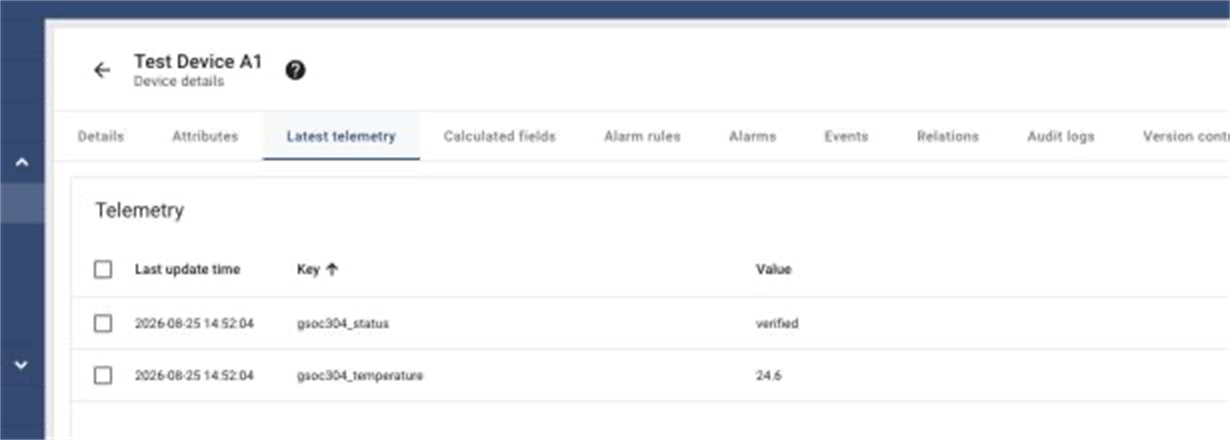
The screenshots are examples; their keys and values differ from the requests above. Check the data you sent.
After telemetry has been written in batches, query it with the IoTDB table-model CLI or a JDBC client. Replace <device-id> with the device ID from ThingsBoard:
USE thingsboard;

SELECT time, entity_id, key, bool_v, long_v, double_v, str_v, json_v
FROM telemetry
WHERE entity_id = '<device-id>'
ORDER BY time DESC
LIMIT 10;

SELECT time, entity_id, key, bool_v, long_v, double_v, str_v, json_v
FROM telemetry_latest
WHERE entity_id = '<device-id>'
ORDER BY time DESC
LIMIT 10;

SELECT time, entity_id, attribute_scope, key, bool_v, long_v, double_v, str_v, json_v
FROM entity_attributes
WHERE entity_id = '<device-id>'
ORDER BY time DESC
LIMIT 10;
Compare the entity ID, key, and value. In the telemetry example, ts and value are stored in json_v; the table's time is the IoTDB row time and may differ from the sample timestamp in the request. Check attributes by scope and value type; for example, a string attribute in CLIENT_SCOPE is stored in str_v. Latest telemetry and attributes can also be read from the ThingsBoard device page.
3. Select Storage Paths
Keep the relevant selectors and properties in SPRING_APPLICATION_JSON:
| Storage path | Configuration | Description |
|---|---|---|
| Historical telemetry | database.ts.type=iotdb-table, iotdb.ts.experimental-raw-only=true | Supports writes, raw queries, deletion, and time-window aggregation. This compatibility-named property must be set with the historical telemetry selector. |
| Latest telemetry | database.ts_latest.type=iotdb-table, iotdb.ts_latest.cluster_mode | Depends on historical telemetry storage. Without this selector, ThingsBoard continues to use its original backend for latest telemetry. |
| Entity attributes | database.attributes.type=iotdb-table, iotdb.attributes.cluster_mode | Independent of telemetry storage. When enabled, the extension provides the attribute DAO. |
When enabling latest telemetry or entity attribute storage, set a valid corresponding cluster_mode:
- For one ThingsBoard node, use
disabled. - For multiple ThingsBoard nodes, use
sticky-routingonly if writes, updates, and deletes for latest values and attributes of the same device or entity are consistently routed to the same node. This setting does not configure ThingsBoard traffic routing. - In a multi-node deployment without sticky routing,
disabledcan produce inconsistent results when different nodes concurrently update the same latest-value key or attribute. The extension does not coordinate cross-node writes.
Here, “node” means a ThingsBoard node, not an IoTDB node. disabled does not turn off storage. If the corresponding backend is enabled and cluster_mode is missing, empty, or set to another value, ThingsBoard fails to start.
4. Data Migration and Limitations
- Existing data: The extension does not migrate data automatically. Backfill and verify an existing instance before switching. After enabling attribute storage, old attributes that were not migrated may no longer be readable through ThingsBoard.
- Data retention: IoTDB applies TTL at the table level and does not apply ThingsBoard per-record TTL.
telemetry_latestdoes not expire automatically by default and is not affected by the historical telemetry table TTL; plan its retention separately. - Data types: Keep the type consistent for the same entity, key, and timestamp. Changing the type across batches can make that data point unreadable.
- Version notifications: Latest telemetry and attribute operations return a
nullversion; notifications requiring a non-null version will not work. - Configuration rollback: Restoring the original storage configuration does not move data back from IoTDB. Plan a backfill or synchronization separately if you need to preserve data written during the integration.
5. References
For configuration parameters, table schemas, and migration mappings, see the IoTDB ThingsBoard Table extension documentation. The module README.md provides an overview; docs/user-guide.md and docs/migration-guide.md provide detailed usage and migration guidance.